Item Groups
A group answers the question "what kind of product is this at all": power tools, consumables, protective equipment. An item card belongs to at most one group (the field may also be left empty), and it is by group that reports are built, discounts are set and price lists are filtered.
Where to find it: Modules → Stock → Registers → Item Groups
The group's second job is less obvious: it can carry the ledger accounts and the VAT rate for a whole family of items at once.
A worked example
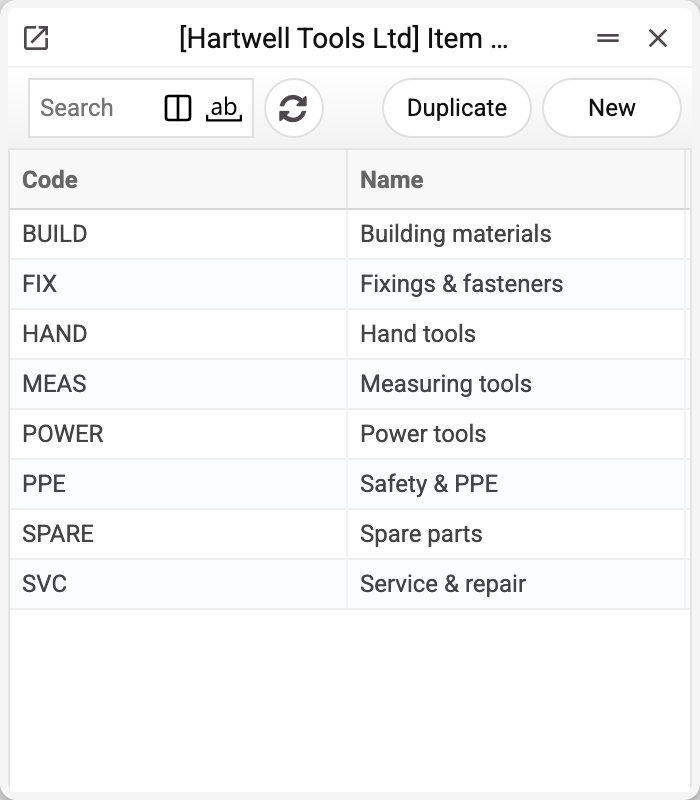
In the demo company the groups describe the range of a tool shop: power tools, hand tools, fixings and fasteners, building materials, safety equipment, measuring tools, service and repair, spare parts.
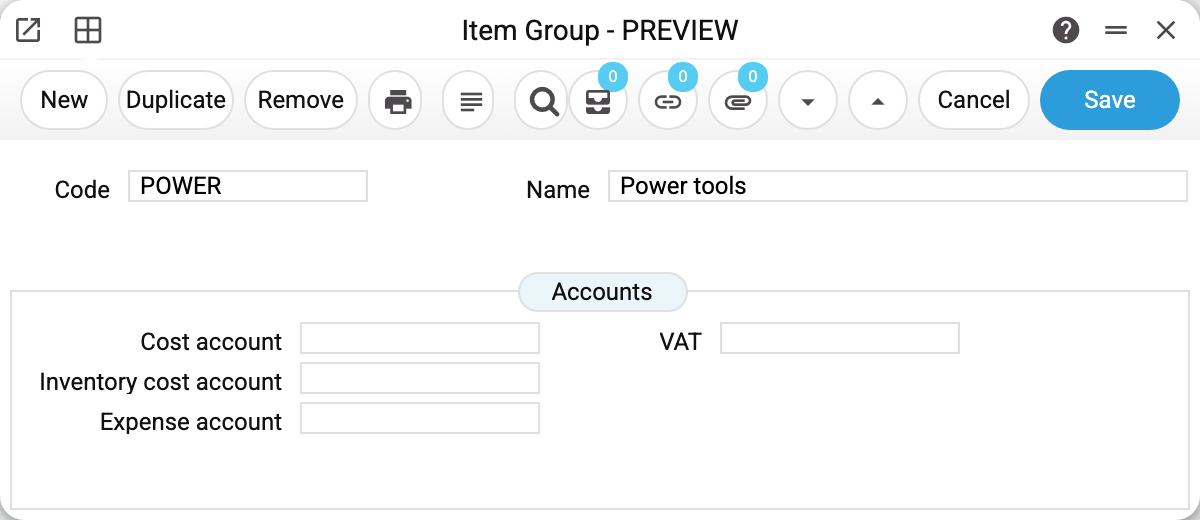
The group POWER "Power tools" is the one the drill from the item card article belongs to. Besides a code and a name, the card carries an "Accounts" tab:
- Cost account — where cost of sales is posted;
- Inventory cost account — where the goods sit while they are in stock;
- Expense account — filled into a vendor invoice row when an item of the group is chosen there. In production and production operations only non-stock items (work, services) need it: their value is posted through this account, and without it on the item card or in the group the document will not post. Stock material is written off from the inventory cost account;
- Revenue account — where the revenue of rows with the group's items (net of VAT) goes in a customer invoice, credit note and POS receipt; returns are debited to it too;
- VAT — the VAT code for rows with the group's items. In sales documents a row takes it when neither the customer card nor the item card has a code; in customs clearance — when the item card has none. A code missing from the VAT rate register is skipped, and the row takes the code from the general setting.
Why these fields are empty in the demo database
The system looks for a posting account down a chain and stops at the first level that is filled in. The full chain belongs to the inventory cost account:
item card → item group → location → the general "Account Usage" setting
The cost account has no location level: item card → item group → the general setting. The expense account has no general setting either — only the item card and the group. Revenue has a chain of its own: document row → item group → the general setting (the sales account in "Account Usage", and for a credit note the returns account from there). There is no item card or location level for it. The row's own account — it comes, for example, from a quotation, sales order or rental agreement row — overrides both the group and the header; the "Sales account" in the header of the invoice itself overrides the group.
Whatever you write at a higher level overrides everything below it. In the Ukrainian demo companies the accounts sit at the location level — the goods warehouse posts to 281 and the spare-parts warehouse to 207 — so filling in the group would override that split and send spare parts to the goods account.
Hence the rule: fill in accounts on the group when the accounting splits by kind of product, not by where it is stored. If it splits by warehouse, leave the group empty.
Typical situations
Moving an item to another group. Just change the field on the card. Documents store the item code rather than the group, so old reports recalculate along the new grouping — the past does not freeze.
A group that is still referenced cannot be deleted. If item cards (or a discount matrix, a quotation price list, a serial number range for items, eTIMS item group codes in the Kenya edition) hold the group, deletion is refused and names the place that uses it. The guard is deliberate: the cards would be left holding the code of a group that no longer exists, and the group's accounts would stop being suggested in documents. So the order is: move the items to another group first, then delete the empty one.
A group is not a classification. An item has exactly one group, answering "what is this". The classification (a field on the card) is a set of labels from the classification register, an item may carry several, and they exist for filtering in reports and stocktaking.
A new item's code by group. If the code of a new item card is left empty, the system issues one itself — from the range set for the item's group in the "Serial Number Range for Items" setting, or from the general range when the group has no row there.
Two groups with the same name. A second group with a name that already exists will not save: "Group with this comment already exists!" The comparison is literal — a name that differs only in upper and lower case passes, and a report by group then shows two separate lines. Keep the register tidy.
Where to look next
- Items/Services — where the group is chosen;
- Locations and account usage — the other levels of the account chain;
- Discount matrix — a discount can be set on a whole group;
- PO list report — an example of a report filtered by group.
Print variables
Values available in this document's printed form templates. How to write a variable in a template — see Print Forms.
Header fields:
| Variable | What it holds |
|---|---|
| ItemGroup_No | Code |
| ItemGroup_Comment | Name (Code) |
| ItemGroup_StockAcc_Comm | Name (Inventory cost account) |
| ItemGroup_ExpAcc_Comm | Name (Expense account) |
| Acc_No | Cost account (code) |
| Acc_Comment | Cost account (name) |
| ItemGroup_VAT | VAT |
| ItemGroup_StockAcc_No | Inventory cost account |
| ItemGroup_ExpAcc_No | Expense account |
The records the document refers to through its form fields (location, customer, currency…) also expose the rest of their variables — code and name are already listed in the tables above, the rest is described in the register's article:
- Cost account — Accounts