Offline Terminals
The register of standalone tills. Each record is one workplace that sells without a permanent link to the server and exchanges data with it now and then: it pulls items and contacts down, and pushes its receipts up.
Where to find it: Modules → Offline → Registers → Offline Terminals
A worked example
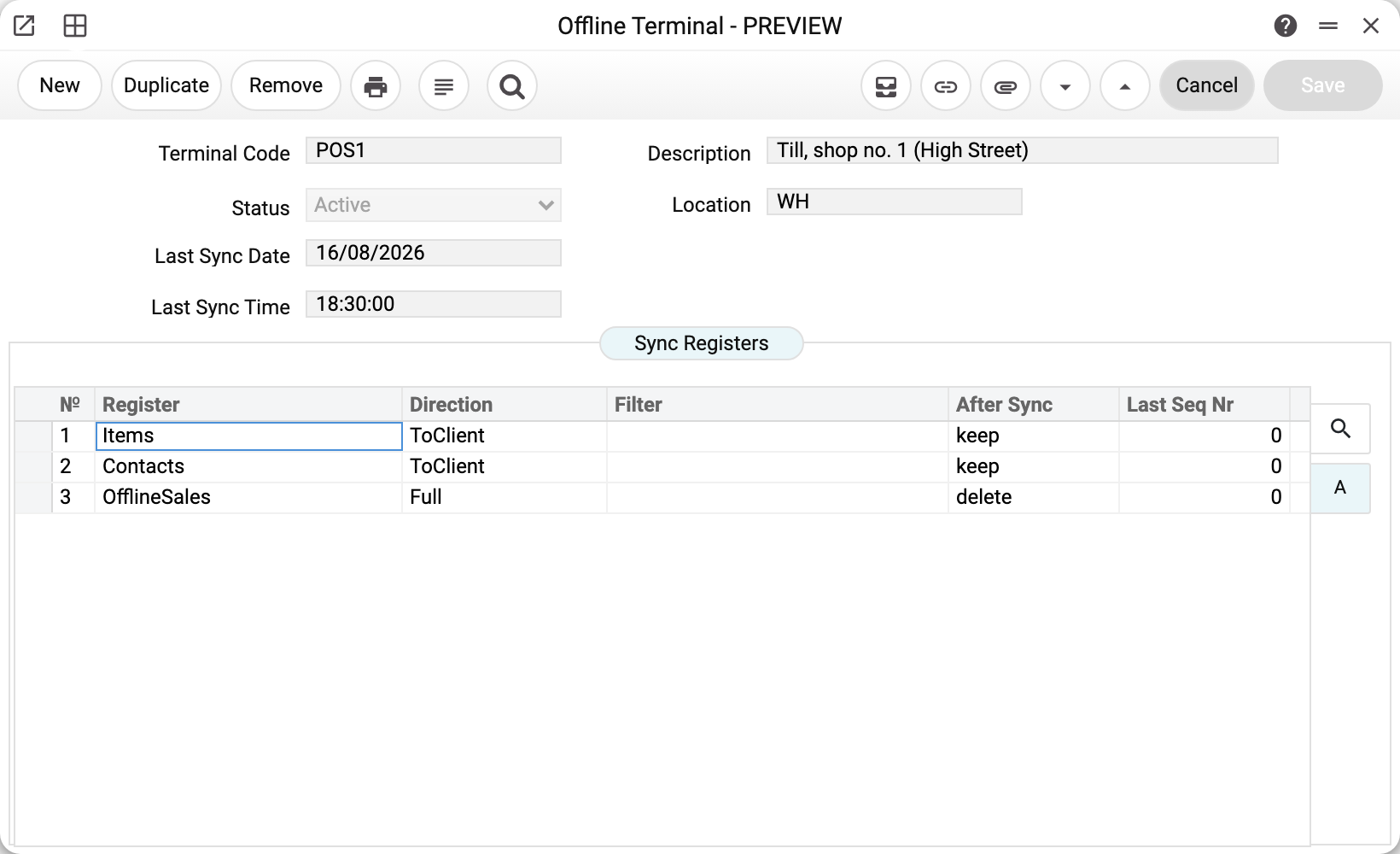
The High Street shop till is registered as terminal POS1:
- Location WH — the stock will be written off from here when this till's receipts become invoices (if stock write-off is turned on in the invoice setting; without it the invoice is posted and the goods stay in stock). It is not a reference field: without a location the conversion stops with an error;
- Status «Active»; the other values are «Inactive» and «Blocked»;
- Last Sync Date — when the terminal last made contact;
- the Sync Registers table — the exchange agreement itself.
Each row is one register and the rule for it:
| Register | Direction | After sync | What it means |
|---|---|---|---|
| Items | ToClient | keep | items travel to the till and stay there |
| Contacts | ToClient | keep | so do customers, and they stay |
| OfflineSales | Full | delete | receipts go up to the server and their processing status comes back — only for this till's receipts, into the same receipt it created (matched by terminal code and receipt number); receipts of the company's other tills do not reach it. After Sync = delete is reserved and not applied yet: processed receipts stay on the till |
The terminal sends up only the registers the system itself synchronizes: items, customers and till receipts — those in the table above. A row with any other register and direction ToServer or Full opens nothing: the server refuses with «Register is not allowed for this terminal: …» and writes nothing. The same holds for system journals and settings that only a role with a dedicated action may change (Item history, open invoices and payment histories, Rounding), and for the history of record changes. These records are made by posting documents — including the invoices the server creates from the till's receipts.
The Last Seq Nr column is not filled in yet. The counter of how far the changes have already been taken is kept by the terminal itself — thanks to it the terminal tops up only what is new instead of re-reading whole registers.
Status is the access switch
A terminal works with a long-lived key, but the server checks its status on every call. So a till that was lost or retired is stopped not by revoking the key but by setting status 2: the very next exchange is refused.
Typical situations
Adding a new till. Code, description, location, status 1 — plus the exchange rows. The till then needs its own number range, or it has nothing to number receipts with.
A till is not syncing. Check the status, then Last Sync Date and Last Sync Time: if they have not moved for a long time, the terminal has not reached the server. An empty exchange log says nothing about this: it does not record rounds in which nothing was transferred.
Changes reach the till with a delay. The till takes only what the server has already written for good. While a long data operation runs there (an import, a recalculation), the exchange hands out nothing newer than its start — those changes arrive in the next session after it finishes. This way the till misses no change.
A till moved to another shop. Change the location — new receipts will be written off from it; invoices already created stay as they are.
A till is no longer used, but its terminal will not delete. A terminal that already has receipts, a number range or invoices from its receipts cannot be deleted: the system refuses with «A record of «Offline Terminals» is used in: …» and advises «To retire the terminal without deleting it, set its status to «Terminal inactive» or «Terminal blocked»: it stops syncing» (in the window these statuses are «Inactive» and «Blocked»). Do exactly that: the receipt history stays tied to its till, and a new terminal with the same code will not pick up someone else's numbers.
Where to look next
- Offline number series — what the terminal numbers receipts with.
- Offline sales — what the till sends to the server.
- Offline sync settings — the default customer and payment terms for converting receipts (nothing reads the exchange address, interval and timeout fields yet).
- Offline till — step-by-step setup from scratch.