Departments
The workshop's branch: the point where devices are taken in and money is collected. Every service order belongs to a department — without one no work sheet can be created, and once a payment is recorded the order's department can no longer be changed.
Where to find it: Modules → POS (also in modules: Service Orders) → Registers → Departments
The register lives in the Service Orders module.
A worked example
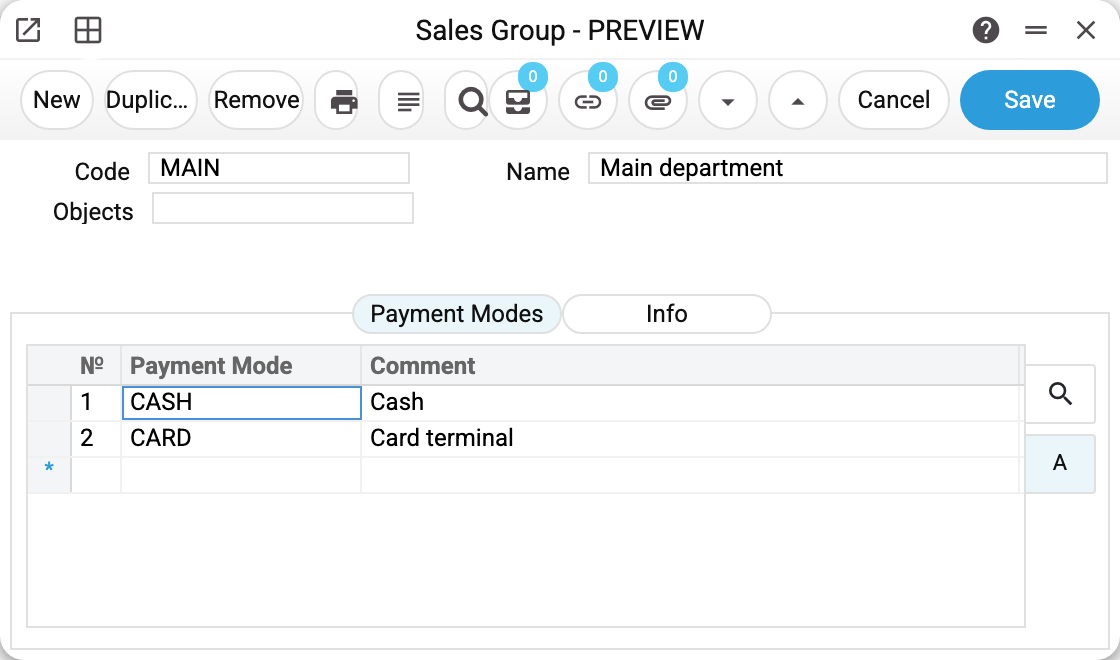
The demo department MAIN «Main department»:
- Code, Name and Objects — the branch's analytics; its objects are pulled into every order of this department, so revenue and debts can be viewed per branch.
- The «Payment Modes» tab — the methods by which this department's service orders are paid: in the demo, cash (CASH) and a card terminal (CARD). The order's payment window shows exactly these methods, each with its own amount. The modes themselves live in the «Payment Methods» setting. The POS till does not read this tab: a till's payment methods are set in POS payment modes, per till login.
- The «Info» tab — the branch's reference details: name, addresses, phones, e-mail. They do not reach printed forms — the department's print variables are listed below.
Print variables
Values this record adds to printed form templates — its own and those of the documents that refer to it.
Record variables:
| Variable | What it holds |
|---|---|
| Code | Code |
| Name | Name |
| Objects | Objects |
| Series | Document Number Series |
| Order_No | Series |
Common situations
«Select Department from the list of existing ones». Creating a work sheet requires a department on the order — pick one and save.
The order's department won't change. Once paid, the department is fixed — so the order does not «migrate» between branch tills. A payment means cash, a bank card or a prepayment above zero; the repair cost is not a payment. Once the order has a payment, the window puts the previous department back; and if the payment was already in the saved order, saving with another department refuses with "Department cannot be changed after payment".
A department code will not change. Once saved, the code cannot be changed: orders, till buttons and reports, cash in and cash out find the department by it. The system refuses: "Can't change code". The name, objects, payment modes and details can be changed.
Field reference
| Field | Description |
|---|---|
| Code, Name | The branch's identity |
| Objects | The branch's analytics; inherited by its orders |
| Payment Modes | The payment methods used to pay this department's service orders; the POS till takes its own from POS payment modes |
| Info | The details: name, addresses, phones, e-mail |