Rental items
When equipment is hired out, "ten breakers in the warehouse" is not enough: the customer received one particular machine with one particular serial number, and that same machine has to come back. Every unit of the hire fleet therefore gets its own card.
Where to find it: Modules → Rental → Registers → Rental items
The card has a life of its own: a status, an hour meter and service dates. Who took the unit and when is not shown on the card: issue acts and return acts are linked to the rental agreement, and the card itself is linked only to pool transfers and maintenance documents.
A worked example
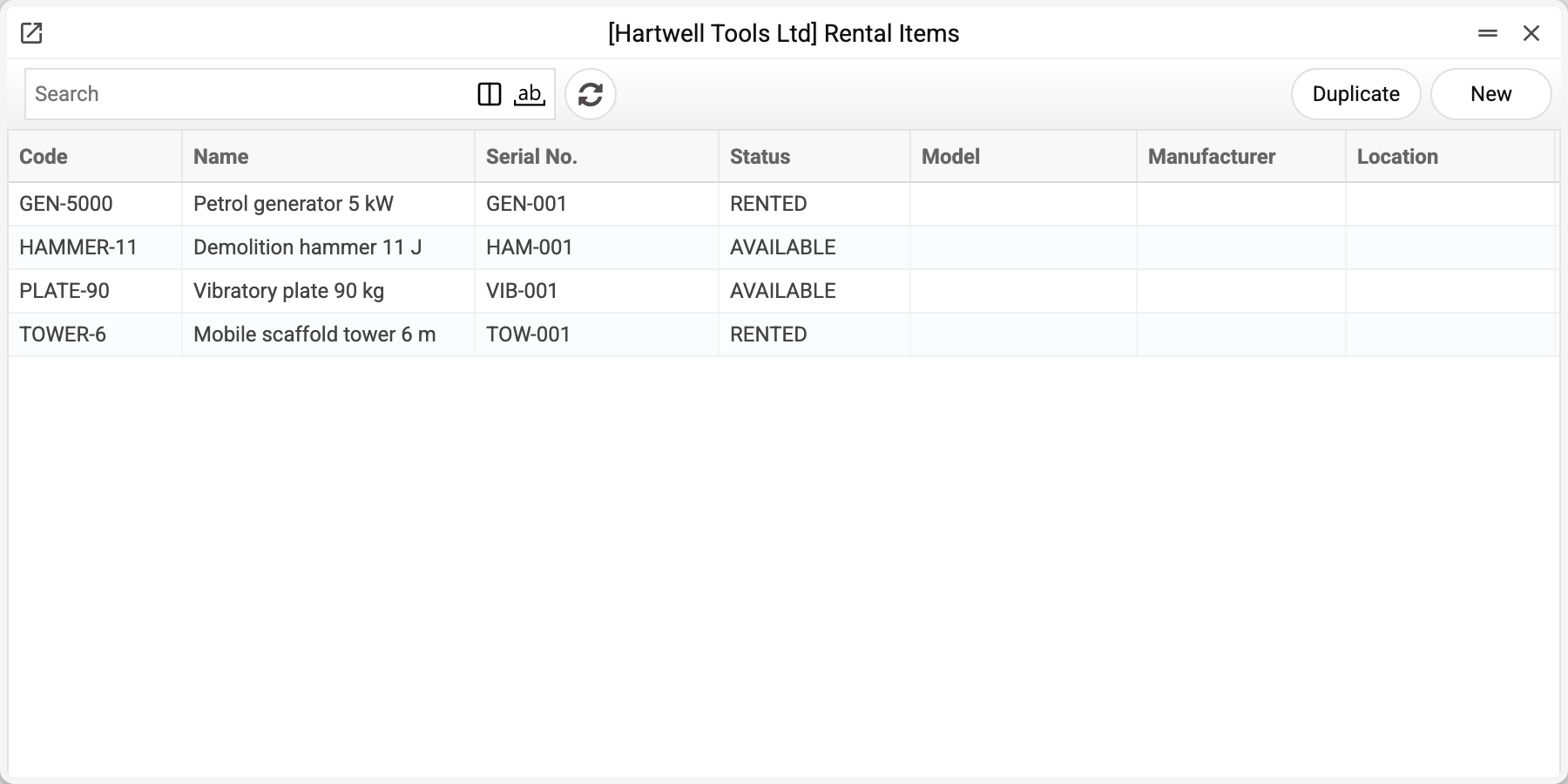
The demo company runs four units:
| Code | Name | Serial No. | Status |
|---|---|---|---|
| GEN-5000 | Petrol generator 5 kW | GEN-001 | RENTED |
| TOWER-6 | Mobile scaffold tower 6 m | TOW-001 | RENTED |
| PLATE-90 | Vibratory plate 90 kg | VIB-001 | AVAILABLE |
| HAMMER-11 | Demolition hammer 11 J | HAM-001 | AVAILABLE |
The generator and the tower are RENTED not because someone typed that status in — they went out to a customer on an issue act, and the system set the status itself.
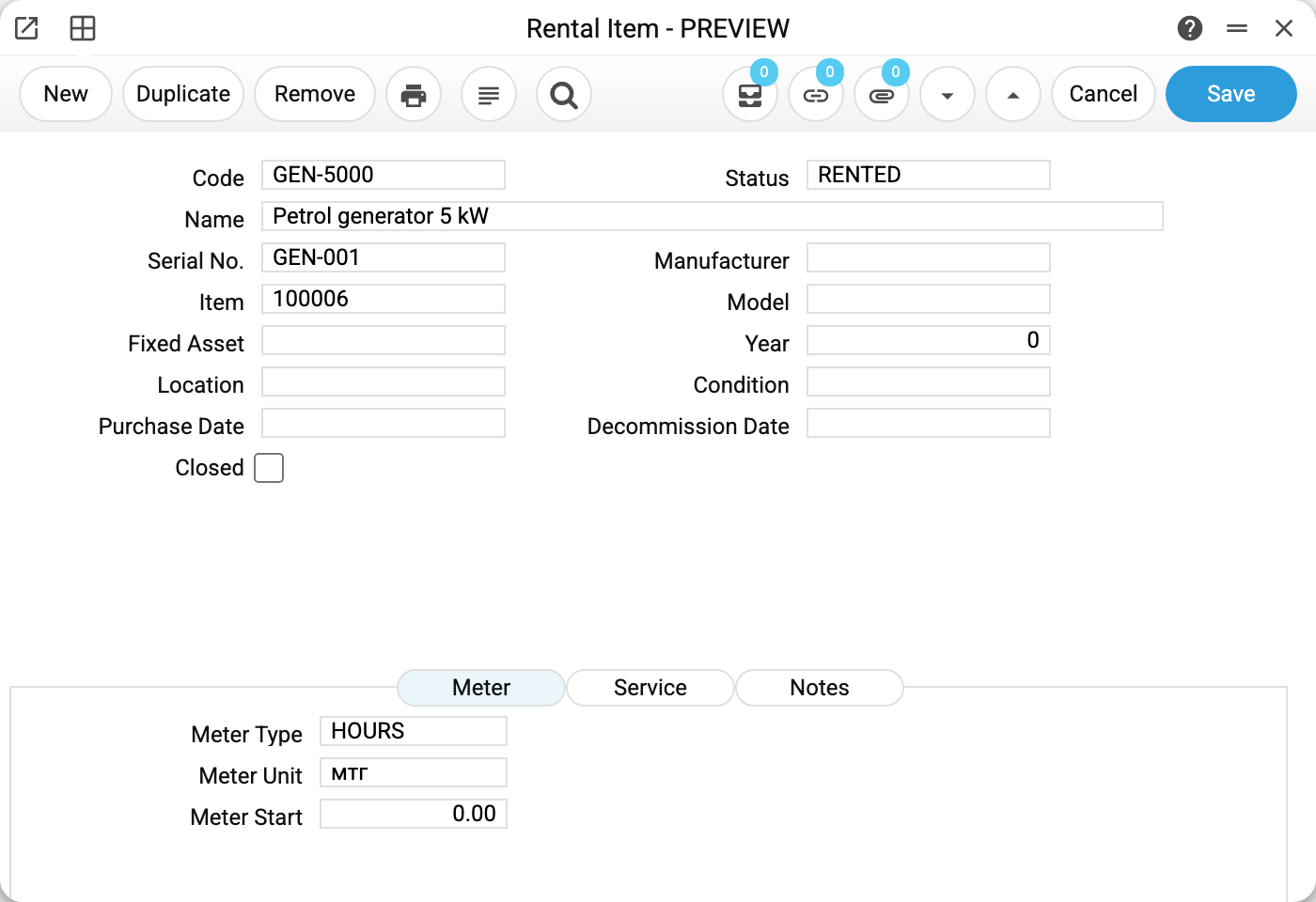
The generator's card holds the code, name, serial number and status, a link to the item 100006 (the stock card of the same model), fields for manufacturer, model, year and condition, plus purchase and decommissioning dates. Three more fields: "Location" — the stock location a pool transfer moves stock through (also needed by a maintenance worksheet); "Fixed Asset" — the inventory number of a fixed asset card if the unit is on the balance sheet (a filled-in number must exist); the "Closed" flag is set by a decommissioning pool transfer.
Below sits the Meter tab: type HOURS, unit "h", starting reading 0. Readings are taken at issue and at return, and the hours worked follow from them.
The neighbouring Service tab is about planned maintenance. You fill in two fields only: Interval (days) and Interval (meter) — after how many days or engine hours the machine is due. The other three — Last Service, Last Meter and Next Service — are read-only. The system stamps "Last Service" and "Next Service" when a maintenance is closed: "Last Service" with the closing day, "Next Service" with that day plus the interval in days. "Last Meter" is currently filled by nothing: neither closing a maintenance nor the acts write it.
Service Item is an entry from the Service Items register, not a stock item. Its code becomes the device on the service order raised for the maintenance (if the field is empty, the item code from the card goes there). On a worksheet the same code lands in a row as an item code, so a worksheet is created only if a stock item with exactly that code exists. Otherwise both the card's button and the maintenance check stop with the refusal "Item '…' is not set".
The maintenance check then watches those intervals. It looks at units in AVAILABLE and RENTED; reserved (RESERVED) and closed units are not checked. By dates the check takes Next Service (or, if that is empty, Last Service plus the interval in days) and compares it with today. On a new card both fields are empty and cannot be filled in by hand — so the check will not catch such a unit by days until its first maintenance has been closed. By meter the check subtracts Last Meter from the latest reading and compares the difference with the interval, but only when "Last Meter" is filled. Since nothing fills it at the moment, the meter check does not fire. The meter counts at all only if it is switched on in the rental settings.
The third tab, Notes, is a single free field for everything that has no column of its own: where it is kept, which keys it takes, what to replace next time.
Documents set the status, people do not
- AVAILABLE — free, can be offered to a customer;
- RESERVED — booked by an agreement but not yet handed over;
- RENTED — issued to a customer on an issue act;
- MAINTENANCE — being serviced or repaired;
- DECOMMISSIONED — written off by a pool transfer.
Setting the status by hand only fools yourself: the next document overwrites it. The right way is to post the matching document.
What the system does on its own
When you create a card and "Resource Type" is filled in the rental settings, the system creates a resource behind it — a booking-calendar entry coded like GEN-5000 | GEN-001. If "Resource Type" was filled only after the card was created, saving the card again does not create the resource. With "Resource Type" empty, the resource appears when the unit is first posted on a rental agreement (with the type RENTAL), or the resource sync routine creates it. Thanks to the resource, equipment availability appears on the same board as engineer availability.
The Item field ties the hire unit to its stock card. When you pick an item, "Manufacturer" gets the item's brand, and "Name" gets the item's name if it is still empty. The item code passes into the rental agreement row (unless one was entered there) and from there into the rental invoice. The invoice does not take the price or the unit of measure from the item card: the price comes from the agreement row, where it is typed in by hand, and the unit in the invoice row stays empty. A pool transfer needs the item too: its stock operation runs on it.
Typical situations
Identical machines, several units. Create a card for each — they differ by serial number. The pair "code + serial number" is unique.
A machine has gone in for service. The card's menu has "Create Service Order" and "Create Worksheet" (the latter raises a worksheet). The button creates the document — the customer from the active agreement, the name from the card — and moves the unit to MAINTENANCE itself; there is no need to set the status by hand. If the unit is already in MAINTENANCE, the card refuses: "Object is already in maintenance"; for a written-off unit — "Object is decommissioned". For a free unit without an agreement no document is created, as there is no customer to take: "Unable to create service document" with the explanation "The object is not rented: the document would have no customer". A worksheet also needs the warehouse on the card. Once the device on the service order is handed out or the worksheet is posted, the unit goes back into hire (or to AVAILABLE if there is no active agreement), and "Last Service" and "Next Service" are updated.
The unit is no longer hired out. Post a FROM_POOL pool transfer with the reason DECOMMISSION: it moves the unit to DECOMMISSIONED and ticks "Closed" itself. The hire history remains, and such a unit can no longer be posted on an agreement.
Better not delete the card. While the unit is on a confirmed rental agreement, deletion is refused: "Cannot delete: the object is used in a confirmed rental agreement (#…). Remove OK flag from the agreement first". Posted issue and return acts and posted pool transfers hold the card the same way — they look it up on every save, including OK removal: "Cannot delete: the object is used in posted rental documents (…). Remove OK flag from these documents first", the brackets listing those documents with their numbers. Drafts of agreements, acts and transfers do not prevent deletion. A unit that is no longer hired out is decommissioned with a pool transfer (see above), not deleted.
Where to look next
- Rental orders — the customer's request for particular units.
- Rental agreements — where a unit is booked for a period.
- Issue acts — the moment a unit becomes RENTED.