Account control
The list of accounts that must not be touched by hand. Transactions on them should be born from documents only — invoices, payments, goods receipts. Put an account on this list and the system will neither let you enter it in a manual transaction nor edit it in an existing one.
Where to find it: Modules → Nominal Ledger → Settings → Account control
Walkthrough
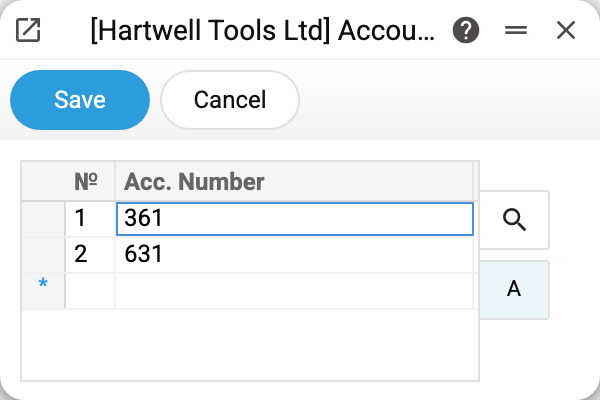
Two accounts are protected in the demo — the classic pair:
- 361 "Trade receivables — domestic customers" — receivables live in invoices and payments;
- 631 "Trade payables — domestic suppliers" — payables in vendor invoices and vendor payments.
The point: the balance of these accounts must match the debt registers to the penny. A manual posting to 361 "to fix the receivables" breaks that reconciliation in a way that is almost impossible to find later — the register says one debt, the ledger another.
One account per row; ranges and comma lists are not supported here.
How the protection fires
The moment you enter a protected account in a manual transaction row (or try to edit a row where it already sits), the system rolls the change back and shows: "The account is prohibited for use/editing by system control 361!". Deleting a row with a protected account will not work either.
The control also works in two more documents, but not the same way everywhere:
- in Simulations — the same on entering, changing and deleting a row, only with a different message: "The account is prohibited for use by system control";
- in Forward Balances — on entering and changing, with the same message as in transactions; but a row with a protected account can be deleted there.
Documents are not affected: an invoice keeps posting Dr 361 exactly as before. That is the design — the control cuts off manual edits specifically.
Common situations
Need to correct the balance of a protected account. Do not lift the protection for a one-off posting — find the document that should have created the record and fix it. If a manual record is genuinely needed (say, a migration adjustment), remove the account from the list, post, put it back.
Opening balances for 361/631 will not save. Yes — the control also fires in the forward balances document. Enter debt balances before enabling the control, or lift it temporarily.
Does this protect against integrations? No. The control works at window input; records arriving through the API or an import are not stopped.