Asset Depreciation
Monthly loss of value of fixed assets, in postings. One run — one charge on the given date: the step amount comes from the card's model, the posting lands on the type's accounts, the card's residual value shrinks. Closed objects, uncommissioned ones and those depreciated down to salvage value are skipped. An object that a disposal document took out in full is closed automatically; from the month after the disposal the service does not charge it, even if "Closed" was cleared by hand. Charge the disposal month before posting the document: after it the card is already closed.
Where to find it: Modules → Fixed Assets → Maintenances → Asset Depreciation
Walkthrough
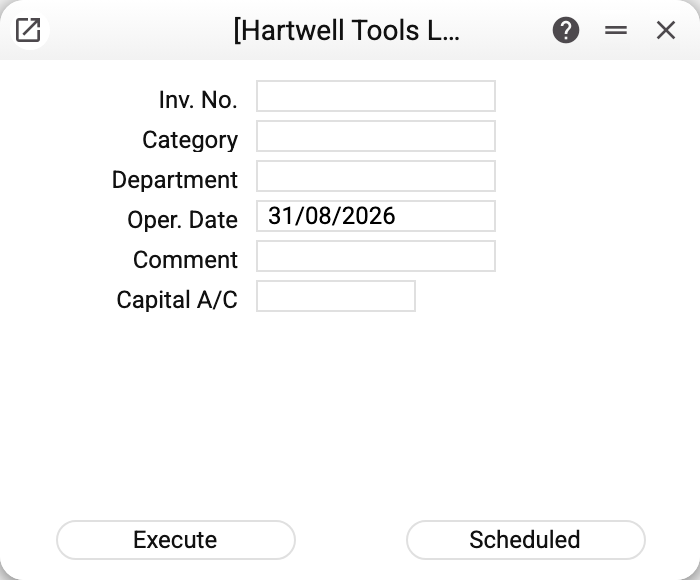
| Field | What it does |
|---|---|
| Inv. No. | One object; empty — everything eligible |
| Category / Department | Charge a whole category or department |
| Oper. Date | Charge date; what is pre-filled is decided by the Assets Setting (month-end in the demo; with the "Put in Use Date" option — the card's commissioning date under the model chosen in the window (Model 1 / 2 below), as soon as its number is typed or picked in "Inv. No."; change the model and the date is recalculated; an empty date means today) |
| Comment | Text for the posting |
| Model 1 / 2 | Which of the card's models to run (main or parallel books). Each model charges from its own residual value and writes its own depreciation date; model 1's postings are "Assets Amort", model 2's are "Assets Amort 2" |
"Execute" is a one-off; "Scheduled" sets up an automatic run at the frequency set in the schedule, and depreciation goes on without a human. The operation date of such a run is the day of the run each time, not the date the schedule was saved with.
The demo vehicle 20_1: three runs (February–April 2024) produced three postings Dr 921 Cr 131 of 4,166.67 each (250,000 ÷ 5 years ÷ 12; the expense and accumulated depreciation accounts come from the VEHICLE type). After each run the card's residual value dropped and the "Depreciation date" moved to the charged month's end.
Charging rules
- Step amount — by the model's method: straight-line = (original value − salvage value) ÷ years ÷ steps per year; "100%" writes off the whole remainder at once (down to the salvage value, if one is set); "declining balance" applies a doubled rate to the remainder, one step per run. A straight-line model with empty or zero "Years" charges nothing: the service refuses with "Failed to process the fixed asset". A straight-line card with an empty or zero "Purchase cost (unit)" or "Qty" is not charged either: the refusal names the field — "Field "Purchase cost (unit)" is not filled!".
- The final step is trimmed: a charge brings the residual value down to the card's salvage value (empty = zero) to within the rounding of fixed-asset amounts — the remainder may end up below or above it by less than one rounding step.
- The models are independent: each has its own residual value ("Residual value" / "Residual value (model 2)") and its own depreciation date. A model 2 charge in the same month as model 1 is a separate charge from model 2's residual value; the order of the runs does not matter. Only a model the object was commissioned under is charged: commissioning under model 1 does not open model 2 for depreciation.
- Double-run protection: a second charge of the same model on the same date for the same object is not created — the service refuses with "Depreciation has already been posted to the terms of the model or the asset has not been put into operation!"; re-running is safe.
- Closed period: if the operation date falls into a period closed in "Closing changes" by the fixed-asset depreciation row (and when that row has no date — by the general "Close by date incl. for all documents" date), the service refuses with "Period closed!". It stays open only to the users entered in the same row in the "Always open for users" column.
- Every charge writes a posting into Transactions and a row into the asset history.
Common situations
The service "ignores" an object. Check in order: commissioned under this very model (the "Used with" date in the model's column), not "Closed" and not fully disposed of by a disposal document in an earlier month (refusal "FA is closed"), salvage value not yet reached, the category is active, this model's expense and depreciation accounts are filled on the type. A run without an inventory number answers with a summary, e.g. "Depreciation posted: 3, skipped (already posted or not in operation): 2, errors: 1", and a line for every object whose charge failed (asset type, model, accounts, category, closed period): "Inventory No. 20_1: Category of fixed assets ASSET_2 is not active!". Objects with nothing to charge (closed and disposed of, not commissioned under this model, "No Depreciation", already charged this period, depreciated down to the salvage value) go into "skipped" without a line — to learn why such an object stays silent, run the service with its number: then it names the reason as a refusal.
Charged one month too many. The reverse service, "Delete Last Depreciation", removes the object's latest charge under the chosen model (the posting, and that model's residual value and depreciation date).
Skipped two months. Run the service twice with the missed months' dates — each run charges one step on its date.
The amounts are not "round". 250,000 ÷ 60 = 4,166.666… — rounding accumulates, so the final step differs slightly: it tops up to the salvage value to within rounding.