Purchase Orders status
The whole life of one order: what was ordered, what has arrived, what has been invoiced and how much has been paid. The report gathers every document connected to a purchase order — goods receipts, vendor invoices and payments.
Where to find it: Modules → Purchase Orders → Reports → Purchase Orders status
It is the first report to open when someone asks "what is happening with our order".
Parameters
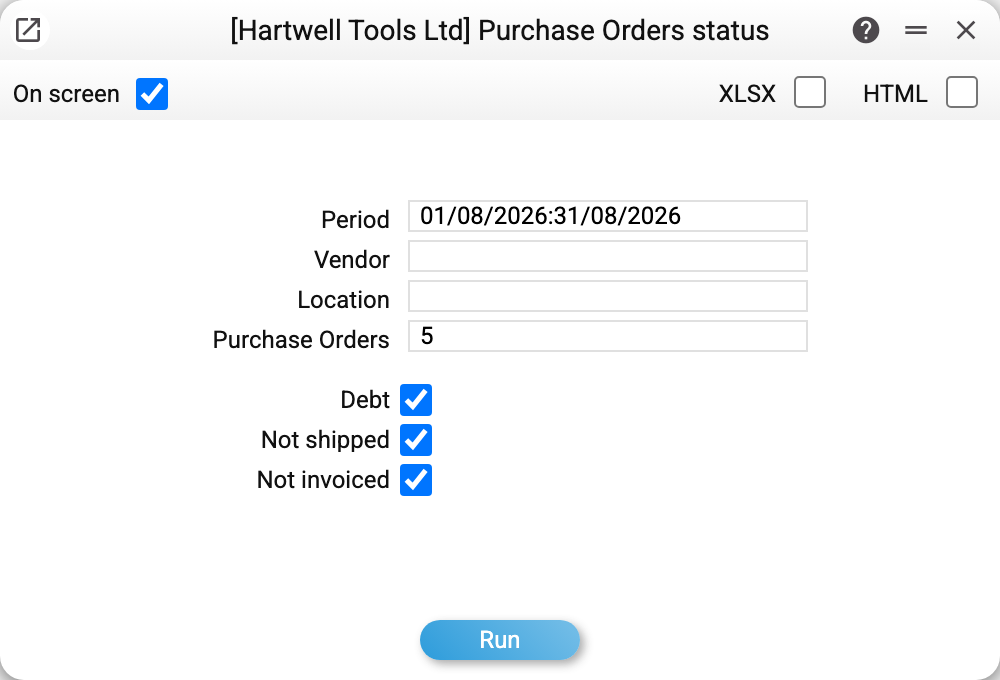
- Purchase Orders — the number of a single order. The period still applies: an order dated outside it is not shown.
- Period, Vendor, Location — the frame when you look at a batch of orders rather than one.
- Debt, Not received, Not invoiced — selection checkboxes. An order stays if it matches any of those switched on: a supplier invoice with an unpaid balance ("Debt"), less has been received than ordered ("Not received"; an approved return to the supplier with "Reduce quantities" = "Received only" keeps the order in this list — the goods are still to be delivered — while "Ordered and received" reduces the ordered quantity), or less has been invoiced by the supplier than ordered ("Not invoiced"; every invoice of the order counts, unapproved ones too, only lines with an item — an invoice for costs from the order adds no quantity — and a credit note reduces the invoiced quantity). If no order matches the checkboxes that are on, the report is empty; with no checkbox on it shows every order of the period. All three are on by default.
- "Debt" switched on also narrows the invoice block: only invoices with a debt remain — fully paid invoices and credit notes are not shown.
A worked example
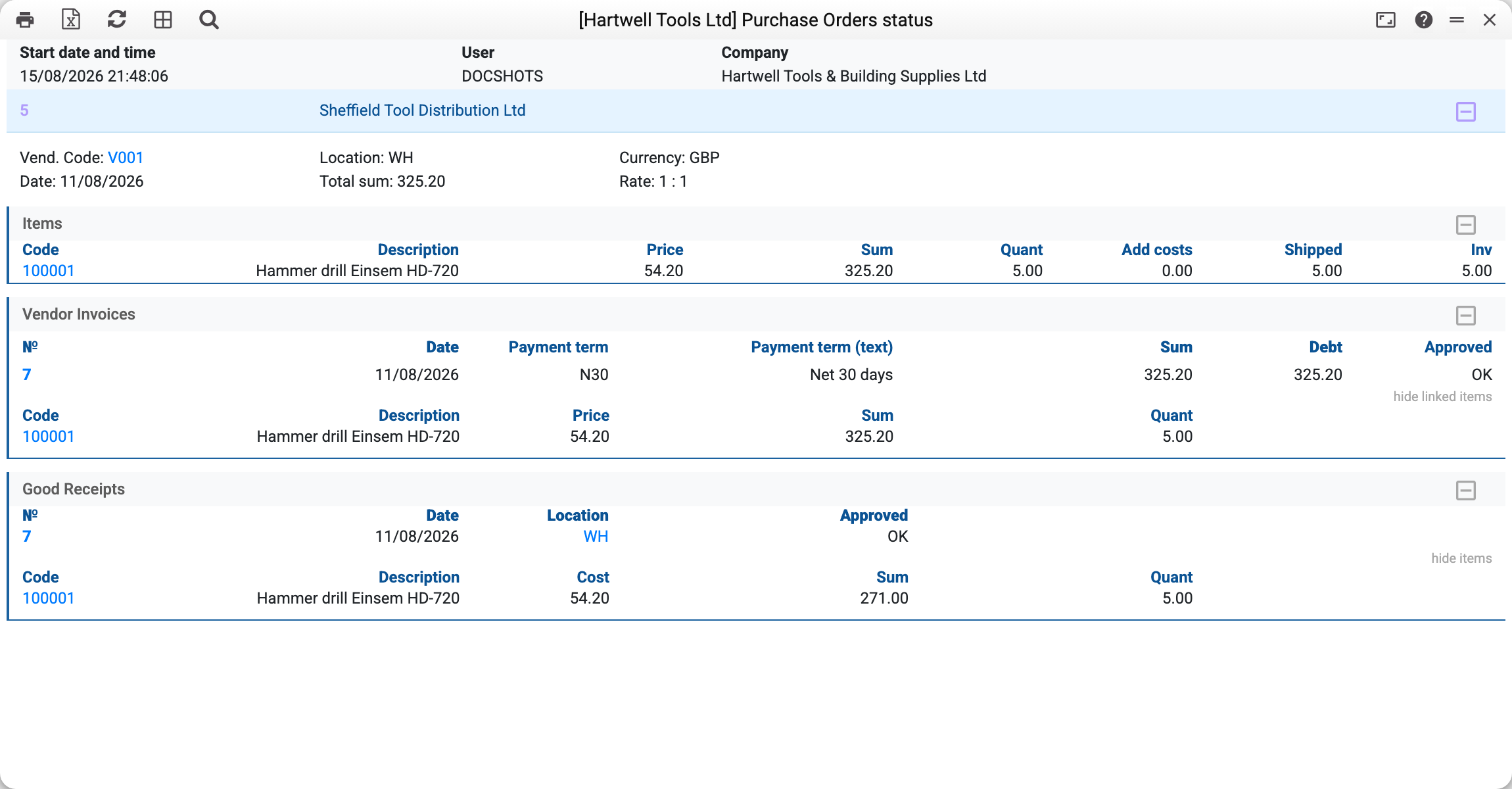
Order No. 5 of 11/08/2026 to Sheffield Tool Distribution Ltd for GBP 325.20. The report is split into blocks, each answering its own question.
Items — what was ordered and what became of it:
| Code | Description | Price | Sum | Quant | Add costs | Shipped | Inv |
|---|---|---|---|---|---|---|---|
| 100001 | Hammer drill Einsem HD-720 | 54.20 | 325.20 | 5.00 | 0.00 | 5.00 | 5.00 |
Five ordered, five received, five invoiced — the order is closed in full. Had three arrived, "Shipped" would read 3.00, and the gap would be goods still in transit.
If the order has an approved Add Costs document, the "Add costs" column shows how much of that order line went through it: the lines of approved Add Costs documents linked to that order line are added up (creating Add Costs from the order sets the link); an Add Costs line without a link (older documents) goes to the first order line with the same item. Every order line appears in the block once, and lines missing from Add Costs do not disappear — their "Add costs" is 0.00.
Vendor Invoices — invoice No. 7 of 11/08/2026 for 325.20 on "Net 30 days" terms, flagged OK, with a debt of 325.20: nothing has been paid yet.
Good Receipts — receipt No. 7 of 11/08/2026 into location WH, cost 54.20 apiece.
The order block is in the order's currency, but the cost of receipts and returns and the Add Costs sums (except "Total cost in curr.") are in the base currency: its code is in the column label ("Cost, UAH"). A vendor invoice not in the order's currency — for example, an additional costs invoice created from the order is always in the base currency — shows its currency next to its number ("7 (UAH)") and in its rows' labels.
Read top to bottom it is the story of the order: ordered → received → invoiced → still to be paid. The outstanding balance is visible immediately, without opening the supplier ageing report.
How to use it
"Where are our goods?" The gap between "Quant" and "Shipped" is what the supplier has not delivered yet.
"Have we paid for this?" The invoice block shows the debt per invoice (with "Debt" on — only unpaid invoices), the payments block shows what left and when.
"Why is this order still open?" Goods arrived but no invoice — the supplier has not sent the paperwork. An invoice with no receipt — someone forgot to approve the goods receipt.
Reviewing a batch. With no order number but a period and the checkboxes on, the report lists the orders with a debt, not fully received or not fully invoiced — a convenient agenda for the weekly purchasing meeting. An empty report means the period has no such orders.
Where to look next
- Purchase orders — the document itself;
- Purchase orders journal — every order for a period;
- Goods receipts, Vendor invoices, Vendor payments — the documents that close an order;
- Supplier ageing — the same payment side, by due date.