Income / Expense Items
A list of reasons why money comes into the cash desk or leaves it: wages, travel advances, taxes, fuel, loan interest. Each item is the account the amount will be posted to when a cash document is approved.
Where to find it: Modules → Cash Book → Registers → Income / Expense Items
The simplest way to think about it: money always moves from one place to another. Where to is defined by the payment method — cash desk, bank, card terminal. What for is defined by the item. So in a cash document the item is the contra account of the posting.
A worked example
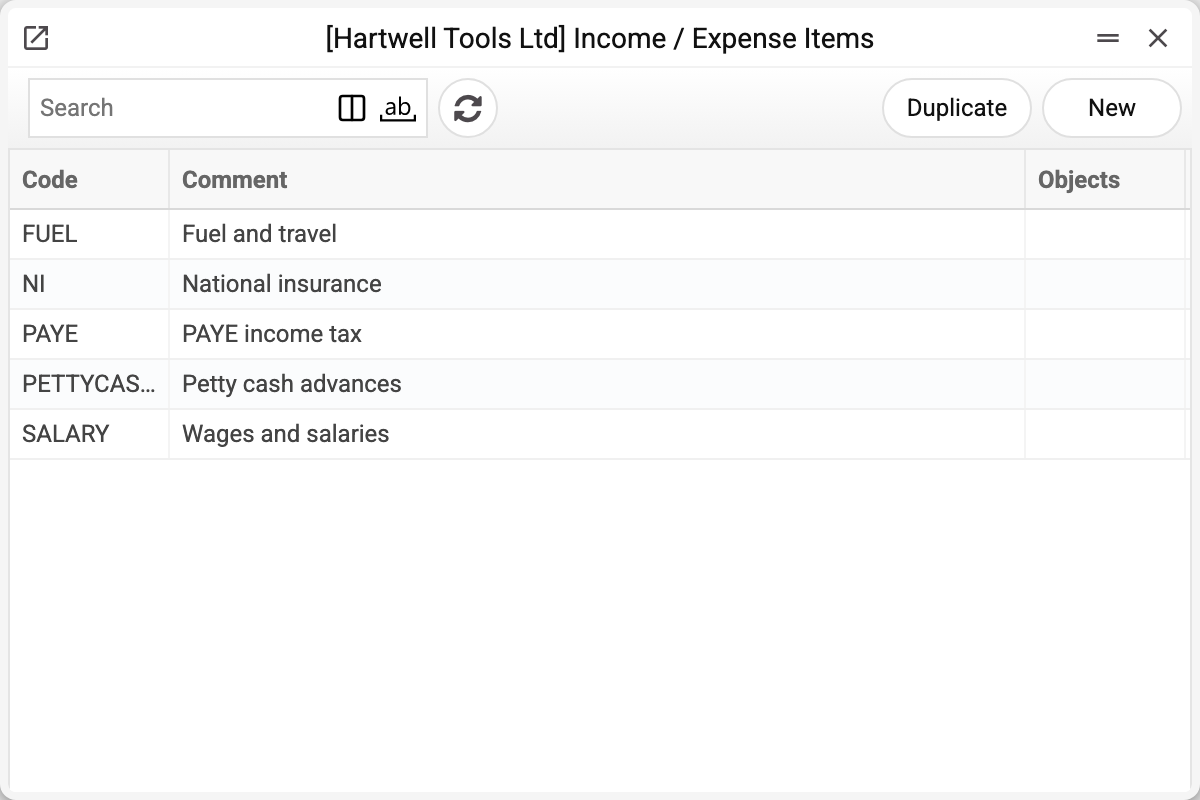
Five items are the whole set this company uses on the demo stand. The list shows only the code, the comment and the objects; the account itself lives in the card. Let us open SALARY:
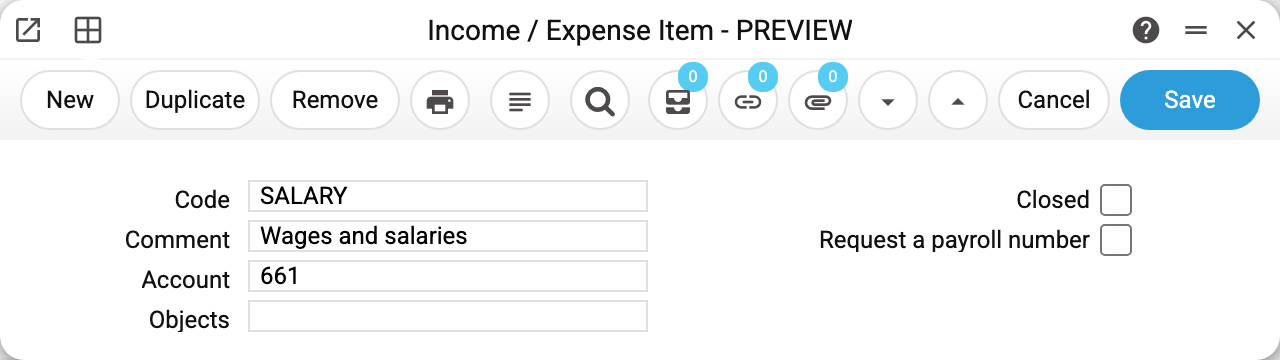
There are only four fields:
- Code — what you type in a cash document row. It is chosen once and cannot be changed: the system refuses to edit a code, because approved documents already refer to it. If the code is wrong, create a new item and close the old one.
- Comment — the name of the item. It is copied into the document row as the default comment, so write it the way you want to read it in the journal.
- Account — the field that matters. 661 "Wages and salaries payable" means: wages paid, wage debt reduced. The account comes from the chart of accounts.
- Objects — the analytics that will go into the posting by default. Rarely filled in: the object is usually set on the document row itself, because every payment has its own.
Two checkboxes on the right:
- Closed — the item is no longer offered in new documents but stays in the old ones. That is how obsolete items are retired without breaking history. Mind that a cash document with a closed item will not save, an old one saved again included — replace the item in it first.
- Request a payroll number — marks the item as "wage payments only": a cash out with it saves only when it carries a "Payroll calculation number". The number is not typed in by hand — it is set when the cash-out is created from a payroll calculation with "Create payout" or "Create tax payments". A cash in has no payroll number, and the flag restricts nothing there. "Paid" in the calculation grows only from the rows created from it: a row with another item (a bank fee, say) can be added to such a cash-out, but a wage row added by hand is not counted — the employee stays unpaid in the calculation. The cash-out window warns about such a row right after saving if it has the same item as the rows created from the calculation; a row with another wage item (holiday pay in a wage payout, say) is not caught by the warning — check such rows yourself.
How an item becomes a posting
Three documents from the stand show the whole mechanism.
Cash in, 120.00, item PETTYCASH (account 372), in cash:
| Account | Dr | Cr |
|---|---|---|
| 301 Cash on hand in national currency | 120.00 | |
| 372 Settlements with accountable persons | 120.00 |
Money arrived at the cash desk (301 — the payment method account), the employee's advance debt went down (372 — the item account).
Cash out, 1450.00, item SALARY (account 661), in cash — the same pair, mirrored:
| Account | Dr | Cr |
|---|---|---|
| 661 Wages and salaries payable | 1450.00 | |
| 301 Cash on hand in national currency | 1450.00 |
Cash out with several rows — payroll taxes paid from the bank (payment method BANK, account 311):
| Account | Dr | Cr |
|---|---|---|
| 6411 Personal income tax settlements | 290.00 | |
| 311 Current bank accounts in national currency | 290.00 | |
| 651 Settlements for mandatory state social insurance | 174.00 | |
| 311 Current bank accounts in national currency | 174.00 |
Every row produces its own pair of postings. The money account repeats in each pair, the item account differs. Hence the practical rule: one item, one reason. Do not lump "taxes" into a single item if your accounting sends them to different accounts.
Print variables
Values available in this document's printed form templates. How to write a variable in a template — see Print Forms.
Header fields:
| Variable | What it holds |
|---|---|
| CLCorsp_Code | Code |
| CLCorsp_Closed | Closed |
| CLCorsp_Comment | Comment |
| CLCorsp_PayrollNumber | Request a payroll number |
| CLCorsp_Account | Account |
| CLCorsp_Objects | Objects |
Common situations
"This item of inc./exp. does not exist" when saving a document — there is no such item in the register. A separate message, "Item of inc./exp. is closed", means something else: the item exists but is closed — closed items are not offered in the lookup and are not accepted in new documents.
A row needs an object. If object control is configured for the item's account, the document will not be approved without an object: the system answers "Enter an object with type …". On the stand account 661 is set up this way — wages cannot be paid "in general", only to a named employee.
The item produces no postings. Check the transaction control settings: if the flags that create ledger entries for cash in and cash out are off, documents will still be approved but no postings will appear.
An item won't delete: «A record of «Income / Expense Items» is used in: Cash Out!» An item can be deleted only while no record holds it: a cash-in or cash-out row (of an unconfirmed document too), an item in the payroll calculation setting (advance, salary, vacation pay, personal income tax, military collection, ESV), a planned payment of the payment calendar. Otherwise a document would be left with an item that is no longer in the list and could not be saved again. Item no longer needed — mark it «Closed»: new documents can no longer pick it.
Where to look next
- Cash In and Cash Out — the documents that use the items;
- Income/Expense Items report — the whole reference with accounts in one list;
- Payment Methods — the other half of the posting: where the money moves from and to;
- Objects — the analytics that splits amounts by employee, business line or project.