NP Cargo Types
What your shipment is in Nova Poshta's terms: a parcel, cargo, documents, pallets or tyres and wheels. The tariff depends on it, as do the rules by which the carrier counts weight and dimensions — which is why the cargo type is a mandatory field of an express waybill.
Where to find it: Modules → Nova Poshta → Registers → NP Cargo Types
The book is filled by the data download service.
Menu: Modules → Nova Poshta → Registers → NP Cargo Types.
A worked example
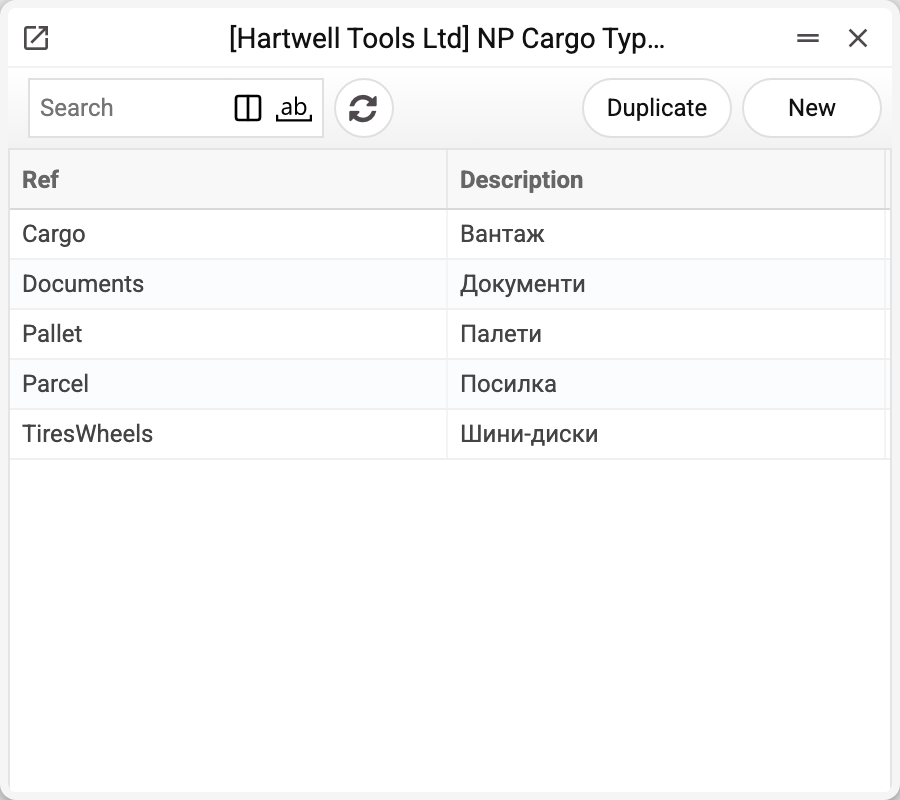
Five records, each with two parts: Nova Poshta's code (Parcel, Cargo, Documents, Pallet, TiresWheels) and the human-readable name. Documents and the cabinet card store the code — which is why the "Cargo type" field of the cabinet card and the "Type of Items" field of a shipment show Latin text. That is not a translation slip: the system hands the carrier exactly the string it expects.
Picking the type fills in the description too: the type's name ("Посилка", "Вантаж") lands in "Cargo description" on the cabinet card and in "Items Description" in a shipment or TTN. That description goes into the express waybill as the description of the shipment. To say what is inside, edit the description after picking the type: picking the type again overwrites it.
For the Documents type the waybill gets a weight of 0.5 kg, and neither the volume nor the parameters of individual places are passed.
Where the data comes from
- Filled by the "Nova Poshta" service — by a full run or with the "Download Cargo Types only" checkbox.
- A fresh list replaces the old one within the company — only when Nova Poshta returned it. If it refused or did not answer, the book stays as it was and the service warns: "Nova Poshta data were not updated, the previously loaded records are kept: …".
Where it is used
- Nova Poshta — the default cargo type on the cabinet card
- Shipments, TTN — the cargo type of a particular shipment
Fields
| Field | Description |
|---|---|
| Ref | The type code passed to Nova Poshta |
| Description | The type name |
Print variables
Values available in this document's printed form templates. How to write a variable in a template — see Print Forms.
Header fields:
| Variable | What it holds |
|---|---|
| NPCargTypRef | Ref |
| NPCargTypDesc | Description |
Common situations
- Not sure what to choose. "Parcel" is an ordinary small shipment, "Cargo" a large or heavy one, "Documents" is paperwork, while "Pallet" and "TiresWheels" are the carrier's separate tariff categories.
- The field shows Latin text. That is intended: the code is stored, not the name.
Nearby
- NP Backward Delivery Cargo Types — what travels back
- NP Pack List — packaging of the places
- Nova Poshta data download — the service that fills the book