Returns To Vendor
The goods arrived wrong, defective or surplus, and the supplier is willing to take them back. A return to vendor takes them off the location and opens the way to getting the money back.
Where to find it: Modules → Stock → Registers → Returns To Vendor
By itself it returns no money. The document handles the goods side: how many units went back and at what cost they left the location. The debt to the supplier is reduced by the credit note created from this return.
The difference from a depreciation is simple and important: a write-off loses you the value of the goods, a return gets it back. That is why defective goods the supplier accepts are never written off.
The document lives in the Stock module. It is created from the goods receipt card with «Create return to vendor» — that is how the lines and quantities are pulled from the very batch being returned.
What approval does
- decreases the balance on the location from the header;
- takes the batches by FIFO, and their cost determines the amount of the return;
- posts a transaction: credit of the stock account, debit of the row's offset account (by default — «Purch. Control Account» from «Account Usage»);
- reduces the ordered quantity on the purchase order — but only if the switch says so. More on that below, and it is the key field of this document.
A worked example
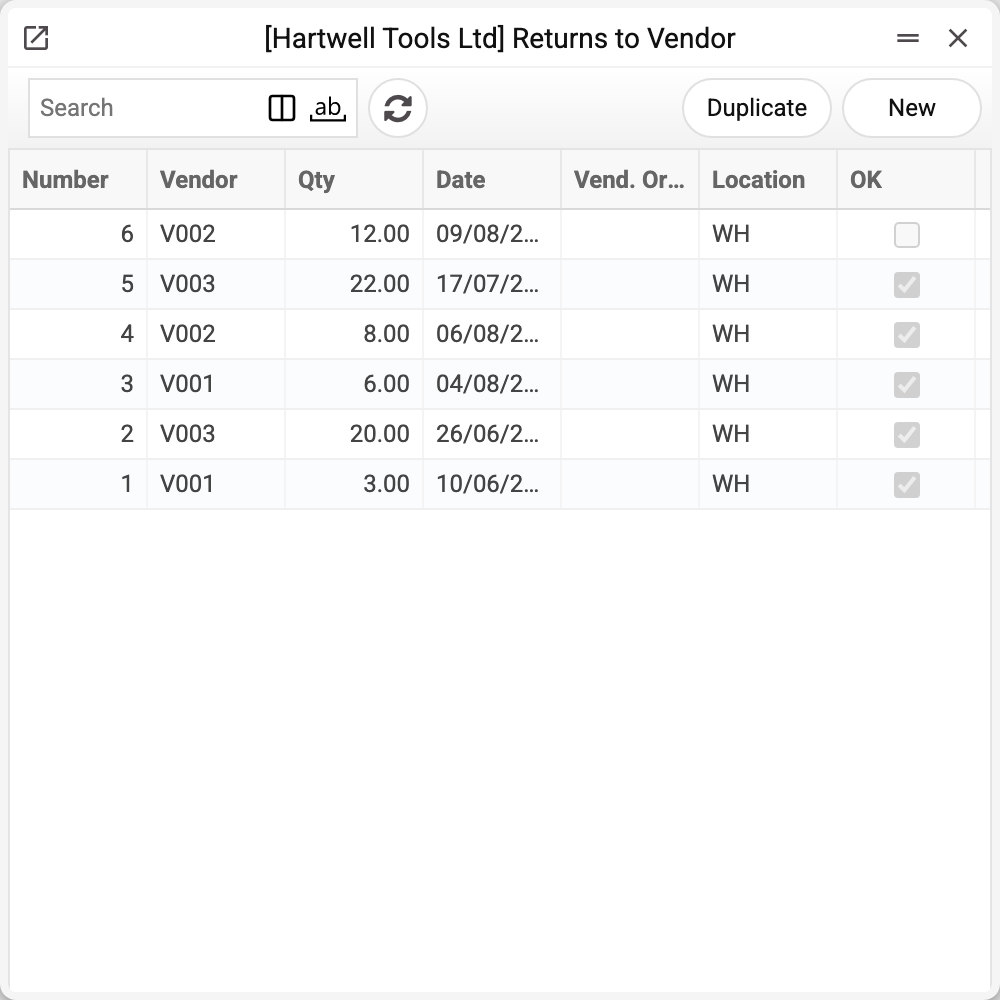
The journal shows the number, vendor, quantity, date, vendor order number, location and approval. No. 6 is not approved yet — it will change the stock only when posted. We will take No. 2 of 26/06/2026.
Cutting discs go back to the supplier: the wrong size arrived.
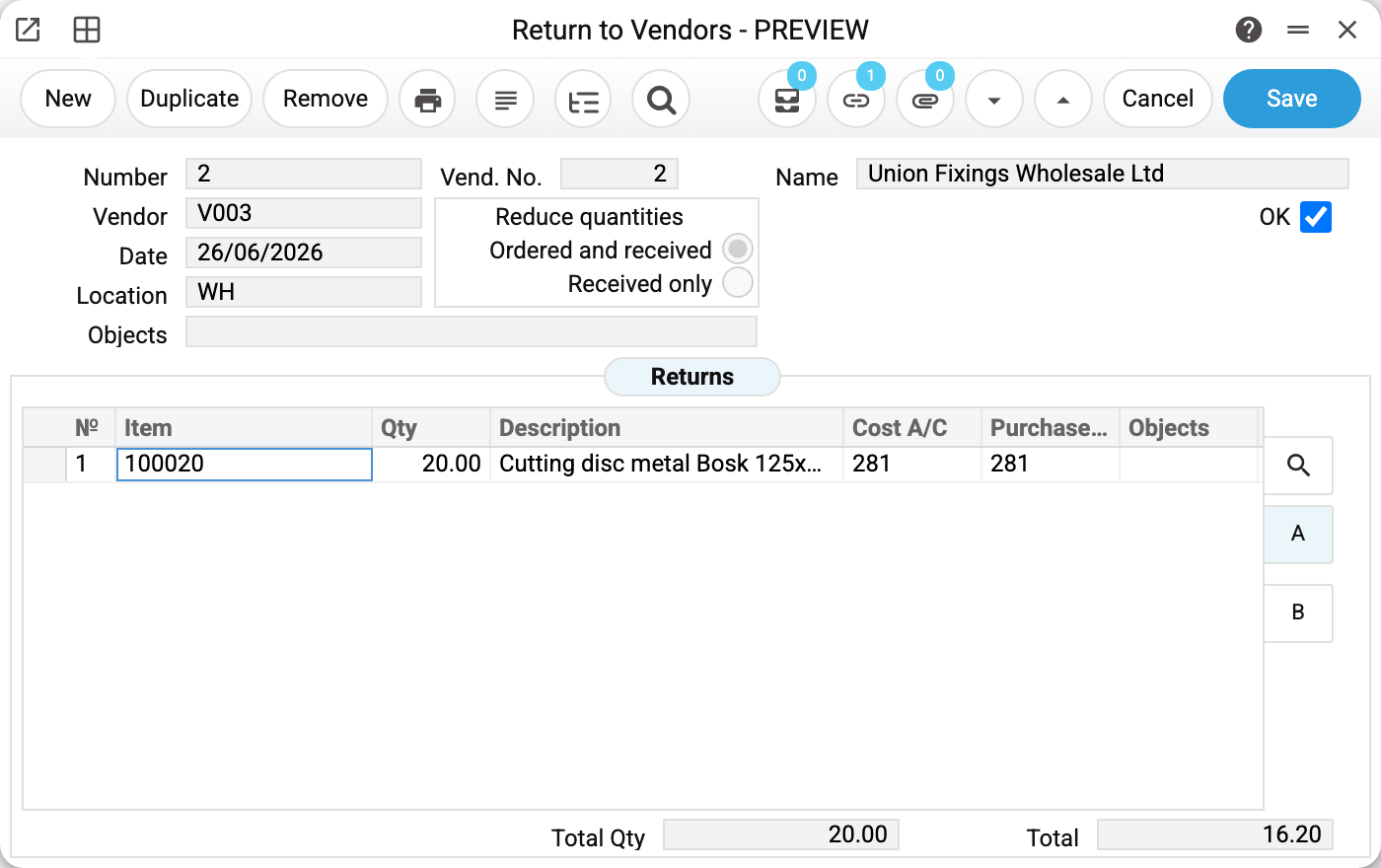
In the header:
- «Vend. No.» — the goods receipt the return was created from. That link is not decorative: while it is there, an item from outside that delivery will not save;
- «Vendor» and «Name» — who the goods go back to;
- «Location» WH — where they leave from;
- «Date» 26/06/2026 — the day they disappear from the balance.
The switch the document will not be approved without
«Reduce quantities» is the only field the system insists on before approval, and not out of spite. It decides what happens to the purchase order:
- «Ordered and received» — the return reduces both the received and the ordered quantity. You are giving those units up entirely: the order counts as fulfilled for less, and no replacement is expected;
- «Received only» — only the received quantity goes down. The order stays open for the difference, and the supplier owes you a replacement.
The difference shows up in the purchase order itself. After approval with the first option the order line quantity and its amount go down by what was returned (a line returned in full stays with quantity 0, and such an order can be closed), and unapproving gives them back. With the second option only the received quantity goes down, and the order expects the goods again. So an empty field is not a forgotten detail, it is an unanswered question: are we waiting for a replacement or not.
Lines
- «Item», «Qty», «Description» — what goes back and how much;
- «Cost A/C» and «Purchase account» — the accounts the transaction runs through. They come from the receipt and the settings and rarely need changing in the line.
At the bottom — «Total Qty» and «Total»: the amount is calculated at cost, not at the supplier's price. What leaves the location is exactly the value it was lying there at.
What the document posts
The transaction mirrors the goods receipt: the goods leave the location and a counter-movement appears on the row's offset account (by default — «Purch. Control Account»). The transaction itself does not change the debt to the supplier — the credit note reduces it (below).
| Dr | Cr | Amount |
|---|---|---|
| the account from the «Purchase account» column | the account from the «Cost A/C» column | 16.20 |
The amount is the same cost that stands in the document total. Lines with zero cost never reach the transaction, and several batches of one position produce a single row.
SERP mode — in data migrated from SERP. If «Account Usage» holds a return-to-vendor variance account and a returns-to-vendor account (the settings window has no such fields — they come with migrated data), the transaction is different: the returns account is debited with quantity × receipt price, the location («Cost A/C») is credited with the cost, and the difference goes to the variance account. The «Purchase account» column does not take part then (except for the variant where the setting «use the receipt account for returns» is on: the debit is «Purchase account», or the purchase account from the settings when the column is empty). In this mode the transaction exists even when the cost is zero but the amount at the receipt price is not.
The receipt price in this mode is the supplier price from the line of that goods receipt at the receipt rate, without freight and additional costs. The return posting itself writes it into the line, so the freight of the returned units goes into the difference — to the variance account, and the credit note no longer returns freight for such a line. A line without such a price (a return posted before 23.10.2026, or a line without a match in the goods receipt) debits the offset account with the cost of the goods receipt line, as before; a line typed by item code — with zero.
The return posts only if the «Returns To Vendor» box is ticked on the «Logistics» tab of the «Records from Subsystems» setting; without it the document is approved with no transaction and no warning. Removing OK always deletes the return's transaction — also when the box was cleared after approval: the box only decides whether a transaction is created.
Where the accounts come from
Unlike most documents, both accounts are visible right in the line — they were filled in when the return was created from the receipt. But visible does not mean fixed: if the column is empty, the account is still resolved at the moment of approval.
- an empty «Cost A/C» — the credit goes to the stock account found along the chain: item card → item group → location card → general settings;
- an empty «Purchase account» — the general purchase account from the settings is used.
So it is worth opening the accounts tab before approving: what stands in the line is what determines the transaction, not the company's general rules.
If both columns hold the same account, the transaction comes out empty in substance — the amount leaves and arrives on one account. That is a sign that the purchase account in the settings coincides with the stock account, and it is worth checking with your accountant: a return should move the value out of the stock to the purchase control account, not shift it inside the stock.
The debt to the supplier is not settled by this transaction — that is what the credit note raised from the return does.
How to work with it
1. Create it from the receipt
The goods receipt card → «Create return to vendor». The lines come across with the quantity not yet returned.
2. Keep only what is going back
Delete the extra lines — a line with zero will not let the return be approved ("Specify quantity"); in the others set the actual quantity. A line with an item that was not in the receipt can be typed into the matrix — it is the save that refuses: "The return line is not linked to a goods receipt line". Return such an item with a separate return, leaving "Vend. No." empty.
3. Choose the reduction condition
«Ordered and received» or «Received only» — see above. The document will not be approved without it.
4. Approve
OK and save. The goods have left the location, the transaction is posted.
5. Get the money back
A credit note to the supplier is created from the return — that is what reduces the debt. Until it exists, the goods are already gone while the payable is unchanged. Its original invoice is a posted vendor invoice that carries the returned row: one linked to the goods receipt, or simply an invoice of this order issued before the receipt. The price on the credit note comes from that invoice's row: a corrected invoice of 10 × 90 is credited at 90 even if the receipt was at 100. The credit note carries the returned goods and the freight share of the returned units, no more than the invoice freight not yet credited by earlier credit notes — from the invoice and from returns, including ones not yet approved. The exception is SERP mode (above): the freight of lines into which the posting wrote the supplier price is already on the variance account, and for such lines the credit note returns only the price. The window lets you create a credit note from the same return a second time, but it takes only what this return has not credited yet: its earlier credit notes, drafts included, are subtracted from both the goods and the freight. When everything returned is already credited, no credit note is created and the window answers «Nothing left to credit: the returned items have already been credited or have not been invoiced!» — the same answer when the returned goods were never on a vendor invoice.
How to be sure the document is right
- The receipt in the header is the one the goods came in on. A return with no link deprives you of the «no more than was received» check.
- The quantity in a line is no more than the header's goods receipt took in on that line, and together with other approved returns — no more than all receipts took in on this purchase order line. The system checks it at approval ("You cannot return more than what was received"), but it is better to know beforehand.
- The «Reduce quantities» switch answers the real question: are you waiting for a replacement.
- The amount looks plausible: it is calculated from the batch cost, not from the price on the supplier's invoice.
- A credit note has been created after approval — otherwise the payable to the supplier stays overstated.
Print variables
Values available in this document's printed form templates. How to write a variable in a template — see Print Forms.
Header fields:
| Variable | What it holds |
|---|---|
| RetTS_Ok | OK |
| RetTS_No | Number |
| Contact_Code | Vendor (code) |
| Contact_Name | Vendor (name) |
| RetTS_Vend_No | Vend. No. |
| RetTS_Vendor_Name | Name |
| RetTS_Date | Date |
| Loc_Code | Location (code) |
| Loc_Name | Location (name) |
| RetTS_Type | Reduce quantities |
| RetTS_Objects | Objects |
| RetTS_Tot_Qty | Total Qty |
| RetTS_Total | Total |
Row fields:
| Variable | What it holds |
|---|---|
| No | Row position number |
| Item_Code | Item |
| Qty | Qty |
| Description | Description |
| CostAcc | Cost A/C |
| CredAcc | Purchase account |
| Objects | Objects |
| Serial_No | Serial No. |
| FIFO | FIFO |
| FIFORowVal | FIFO by Line |
The records the document refers to through its form fields (location, customer, currency…) also expose the rest of their variables — code and name are already listed in the tables above, the rest is described in the register's article:
- Vendor — Contacts
- Location — Locations (
Loc_*) - Company details — name, addresses, bank accounts, officers, the printing user: Main Company
Common situations
The receipt is not approved yet. A return from it will not go through: the goods must first arrive on the location, and only then leave it.
Only part of the batch goes back. A normal case: the line carries the quantity being returned, the rest stays on the location.
The goods are defective but the supplier will not take them. Then this is not a return but a stock depreciation: the value goes to expenses instead of coming back as money.
The return was created by hand rather than from a receipt. That is possible, but there will be no «no more than was received» check and no link back to the order. It only makes sense when the original receipt does not exist in the system.
The button answers "Goods receipt lines without a link key: …". This happens with old receipts: the named lines have no key by which a return knows its receipt line. A return cannot be created from such a receipt with the button — make it by hand, leaving "Vend. No." empty.
Field reference
Header
| Field | Description |
|---|---|
| Number | Document number, assigned automatically |
| Vend. No. | The goods receipt the return was created from |
| Vendor, Name | The counterparty and its name |
| Date | The day the goods leave the location |
| Location | The storage place returned from |
| Reduce quantities | What to reduce on the order: ordered and received, or received only. Required for approval |
| Objects | Analytical objects of the document |
| OK | Approval: removes the goods from the balance and posts the transaction |
Item lines
| Field | Description |
|---|---|
| Item, Description | The position and its name |
| Qty | How many units are returned |
| Cost A/C | The account the value of the goods is written off from |
| Purchase account | The corresponding account of the transaction |
| Objects | Analytics of the line |
Document totals
| Field | Description |
|---|---|
| Total Qty | How many units were returned |
| Total | Cost of the returned goods |