Stocktaking comparison
The shelves have been counted and the differences are in — now they have to become documents: what is missing gets written off, what is extra gets taken into stock. Doing that by hand, line by line, is slow and error-prone.
Where to find it: Modules → Stock → Maintenances → Stocktaking comparison
This service takes the stocktake result, compares it with the book balance and creates the documents itself: a goods receipt for surpluses and a write-off for shortages — linked back to the stocktake they came from, so the document tree shows their origin.
⚠️ This is not a report. The service changes data: new documents appear in the database after it runs, and they are approved straight away — stock changes and postings go to the inventory surplus and deficit accounts from Account Usage (Stock tab) — for serial items the same way. The exception is a write-off in which some item currently has less in stock than is to be written off, and for a serial item also a row without a serial number or fewer serials in stock than are to be written off: that write-off stays unapproved, and the service sends the message "Not all products are available in stock. Check Stock Depreciation …". To look at the differences without creating anything, use the report of the same name — it takes the same filters (the one difference is below, in "Look first").
A worked example
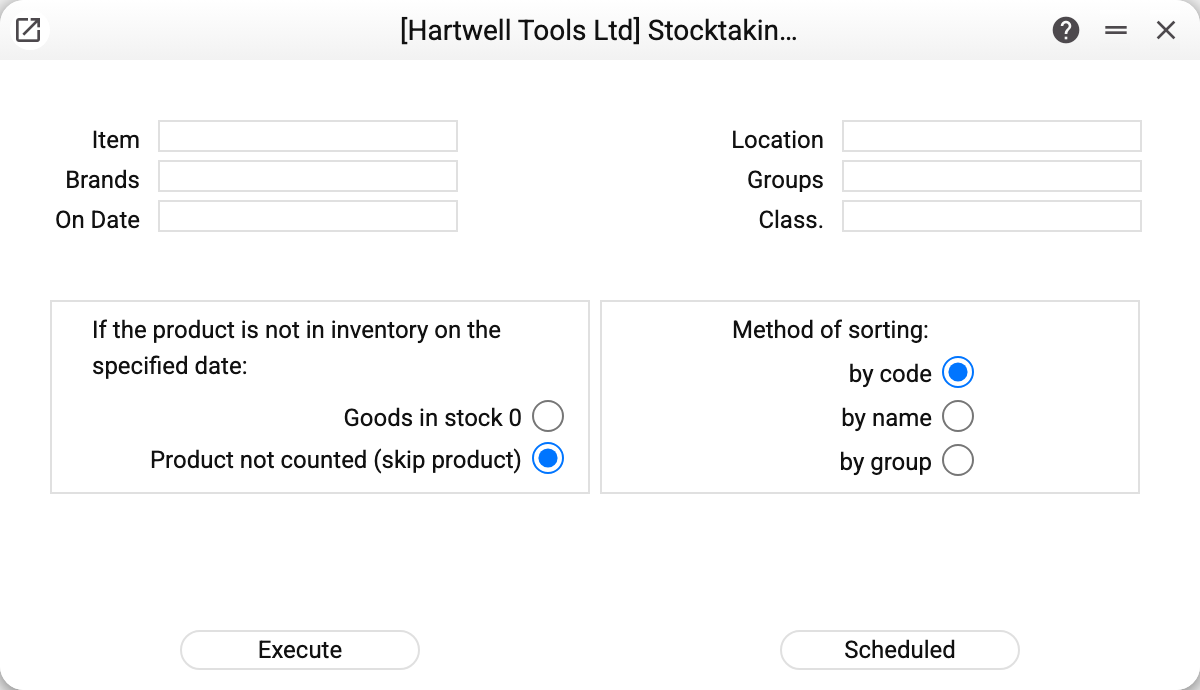
The upper half is the usual filter: item, location, brands, groups, classification and the date to compare on. The location and the date are required ("Location required", "Date required"), and if either of the two inventory accounts is empty in Account Usage the service refuses before comparing anything, naming the field to fill in.
The two option groups below are the reason to read this window carefully.
"If the product is not in inventory on the specified date" — what to do with a position nobody counted:
- Goods in stock 0 — treat it as physically gone and write off the entire book balance;
- Product not counted (skip product) — leave it alone; this is the default.
The difference is enormous. On a spot check (two racks counted) the first option would write off the rest of the warehouse. Switch to it only when the location was counted in full.
"Method of sorting" — by code, by name or by group; it affects only the order of lines in the created documents.
Typical situations
A full stocktake. Everything counted, the differences confirmed — run the service and get the write-off and receipt documents ready-made.
A spot check. Always leave "Product not counted (skip product)", or the system will write off everything that was not on the sheet.
Look first. Before running it, open the comparison report with the same filters: same differences, no consequences. One difference: the report ignores goods receipts and write-offs whose "Stock Take Date" is the comparison date (the service counts them), so after the first run of the service the report keeps showing differences that are already closed.
Run again for the same date. The posted documents of the first run are already counted (their "Stock Take Date" is the comparison date), so no new documents appear for the same differences. An unposted write-off does not change stock: post or delete it before re-running, or one more will appear.
What the window shows after a run. Only "Operation completed successfully!" — the service gives no summary. Look for the created documents by the comment "According to the result of the inventory on" with the comparison date.
Where to look next
- Stocktake — the document it all starts from;
- Stocktaking comparison (report) — the same differences without side effects;
- Write-offs, goods receipts — what the service creates;
- Inventory worksheet builder — the step before counting.