Planned payments
Money that will come in or go out without a document in the system: rent, salaries, taxes, a loan, a client's subscription fee. There are no invoices for it, yet it has to be in the payment calendar — otherwise the calendar shows money that will in fact no longer be there. A planned payment is a record of "what, how much and when", repeated if needed.
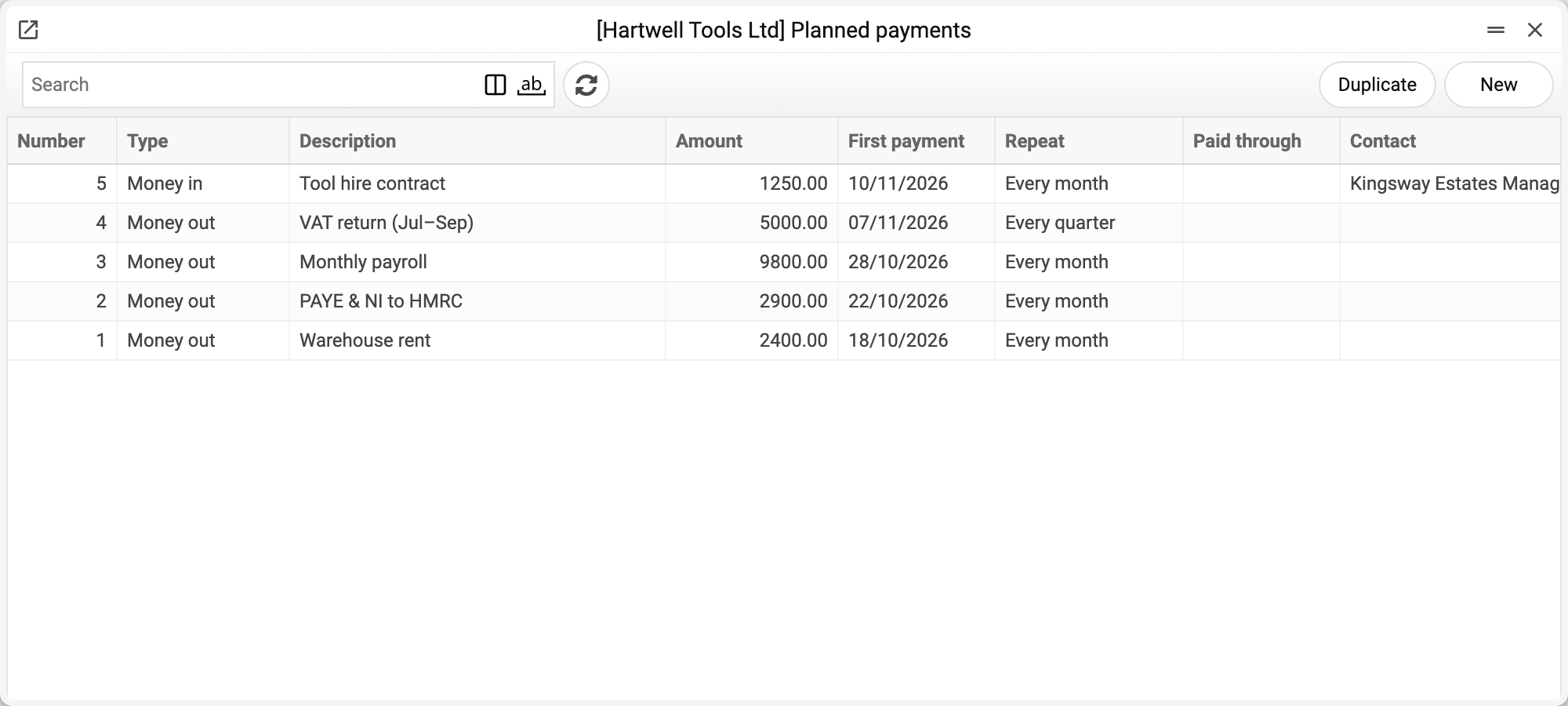
Where to find it: Modules → Cash Book (also in modules: Nominal Ledger) → Registers → Planned payments
A new planned payment can also be created straight from the payment calendar — with the "+ Plan money in" and "+ Plan a payment out" buttons under the summary.
Fields
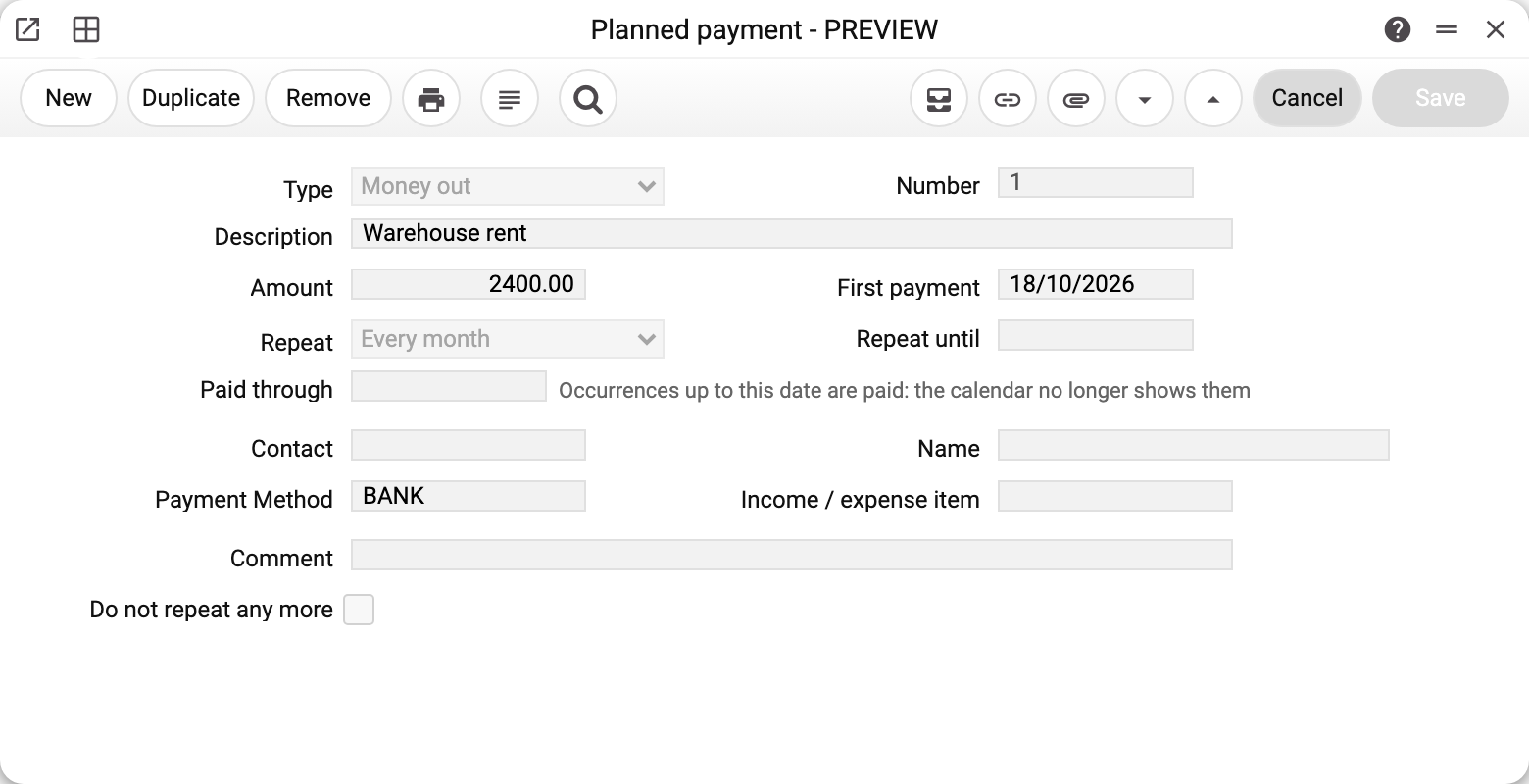
| Field | What it means |
|---|---|
| Type | "Money out" (money will leave) or "Money in" (money will arrive). A new record is "Money out". |
| Description | What the payment is for: "Warehouse rent", "Monthly payroll". This is the text the calendar shows. |
| Amount | The amount of one payment in the company's base currency, greater than zero. |
| First payment | When the payment happens for the first (or only) time. A new record — tomorrow. |
| Repeat | "No" — one-off; "Every week", "Every month", "Every quarter", "Every year". |
| Repeat until | The last date of the repetitions. Empty — no end: the calendar shows repetitions up to the end of its period. |
| Paid through | Repetitions up to and including this date are paid — the calendar does not show them. Set with the ✓ icon in the calendar (after you confirm) or by hand in this field. |
| Contact, Name | Whom we pay or who pays us — optional. The name is filled in from the contact. |
| Payment Method, Income / expense item | Optional. The cash document created from this payment — in the «Payment calendar» («Create a cash receipt…» / «Create a cash payment…») or from the menu of the record itself (see below) — takes them: the payment method goes to the header (bringing the currency, rate and cash desk objects), the item goes to the row. Without a payment method the document amount stays empty — the currency is not known yet; it also stays empty when the payment method's currency is not the base one. In both cases the system warns you and names the planned amount. |
| Comment | Any note. |
| Do not repeat any more | The payment no longer applies: the calendar shows none of its repetitions. |
How repetitions are counted
- Every month and every quarter — on the same day of the month as the first date. If a month has no such day — on its last day: a payment on 31 January goes on 28 February, 31 March, 30 April. The day is always taken from the first date, so a short month does not "eat" the following 31sts.
- Every year with a first date of 29 February — 28 February in a non-leap year.
- Every week — the same day of the week.
A cash document from the payment itself
The menu of an open record has the item «Create a cash payment / receipt…». For «Money out» it opens a new «Cash Out» document, for «Money in» — «Cash In», filled in the same way as with the icon in the calendar: today's date, the payment method (and with it the currency and rate), the item, the amount (when it can be filled in — see «Payment Method» above) and the comment «Planned payment No. “description” for date». The date in the comment is the first repetition not yet paid (after «Paid through»). The document is not saved yet — check it and save it yourself.
- Save the record first: in an unsaved one the system asks «Save the record!».
- If all repetitions are already paid or the payment is marked «Do not repeat any more», there is no document: the system answers «All occurrences of this planned payment are already paid, or it is closed: there is nothing to pay by it». This way a second document for the same payment does not appear by accident.
- The document does not set «Paid through» by itself — mark the payment after paying, as described below. Until the mark is set, the menu item offers the same repetition again.
- The saved cash document is linked to the planned payment: the document shows the «Planned payment» field with its number, and the links button in the window of both the document and the planned payment shows the other one. A duplicate of the cash document carries no link. A document created with the icon in the «Payment calendar» is linked the same way.
Paid — mark it "Done"
A planned payment does not mark itself paid: a cash document created from it is linked to it but does not change «Paid through», and a payment or cash order entered separately knows nothing about the planned payment at all. So after paying, mark it — with the ✓ icon "Done: paid" on its line in the payment calendar. The icon sets "Paid through" to the date of that repetition, and the calendar no longer counts it. The system asks first: "Paid through" is inclusive, so earlier repetitions that have not been marked disappear too. Later repetitions stay.
If it is not marked, a repetition with a past date moves to the calendar's "Overdue — not in the forecast" block (for the last 90 days) — as a reminder that the money may not have been paid yet.
Typical situations
The rent goes up from next month. Set "Repeat until" on the current record to the last date at the old price, and create a new one with the new amount and the first date at the new price. That keeps the history truthful.
A one-off payment was moved. Change the date in the record — the calendar shows it on the new day.
The payment will not happen any more. Tick "Do not repeat any more" or set "Repeat until". The record does not have to be deleted.
A planned payment with a cash document cannot be deleted. If a «Cash Out» or «Cash In» document was created from the payment, the system will not let you delete it — «A record of «Planned payments» is used in: Cash Out!» (or «Cash In») — and suggests ticking «Do not repeat any more»: then the calendar no longer shows the payment. The number and type of such a payment cannot be changed either: otherwise the document would end up linked to someone else's planned payment.
A contact cannot be deleted. If a contact is used in a planned payment, the system will not let you delete it and names where it is used. First remove the contact from the planned payment (or delete the payment itself), then the contact can be deleted.