Customer Discount
The labour rate card by time of work: for every "item + time class" pair — its own hourly rate and its own discount. The card is read by the Time Sheet Report: for every line of a time sheet it finds the "item + time class" pair here and takes the price from it. The discount of the pair goes into the time sheet line itself — when the item and the time class are chosen in it, and for good when the time sheet is approved.
Where to find it: Modules → Project Management → Settings → Customer Discount
The setting lives in the Settings menu of the Project Management module.
A worked example
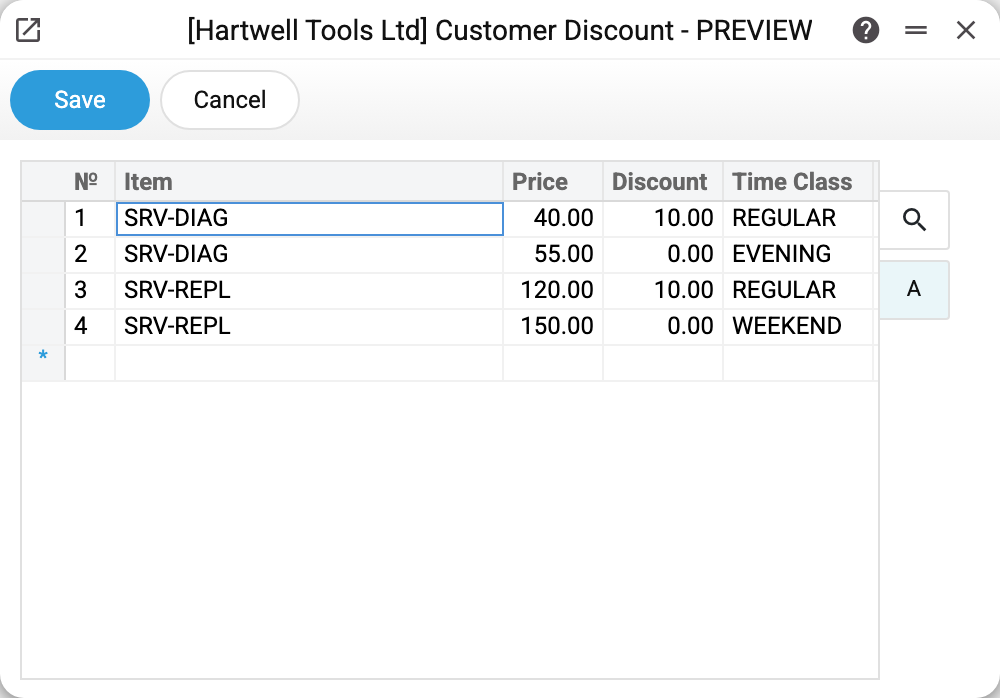
In the demo, diagnostics (SRV-DIAG) costs 40 in regular hours and 55 in the evening; component replacement (SRV-REPL) — 120 in regular hours and 150 on weekends. The 10 discount applies only to regular hours — evenings and weekends go at full rate.
The mechanics: in the report, a time sheet line with SRV-REPL and the REGULAR class gets the price 120 and a 10 % discount — 90 % of its hours go to payment. The same line with the WEEKEND class gets 150 with no discount. If there is no line for the "item + class" pair here, the report shows the hours with a 0 discount and no price or amount.
The price is taken when the report is built, not when the time sheet was filled in: change the price, and the report for past months is calculated at the new one too. The discount is different: when a time sheet is approved it is fixed in the sheet's lines, and a later change of the discount here no longer changes approved time sheets. For an unapproved time sheet the report takes the discount from the line, and if the line has none — from here, at build time. The time sheet itself shows neither price nor discount — only the report shows them.
Common situations
A report line has no price or amount and a 0 discount. The matrix has no line for the "item + time class" pair of that time sheet line — add one.
The report for last month shows different amounts than before. The price was changed: the report takes it from this matrix afresh every time, so the new price applies to old time sheets too. The only way to keep the amounts for a past period at the old price is to export the report before changing the price.
The discount was changed, but the report for old time sheets does not show it. By design: an approved time sheet already has its discount — the one in force when the item and time class were chosen in the line or when the sheet was approved. A new discount applies to lines that have no discount yet — in unapproved time sheets and when they are approved — and to lines where the item or time class is chosen after the edit.
The same item appears several times. By design: one line per time class.
Matrix fields
| Field | Description |
|---|---|
| Item | Work/service from the items reference |
| Price | Hourly rate for this time class — the report takes it |
| Discount | Discount in percent for a time sheet line with this pair; fixed in the line when the time sheet is approved, the report applies it to the line's hours |
| Time Class | When this rate applies |