Condition types
When equipment comes back from hire, the person receiving it has to answer in one word: what condition is it in. To keep those words consistent across every return act — and searchable afterwards — they live in a register.
Where to find it: Modules → Rental → Settings → Condition types
A worked example
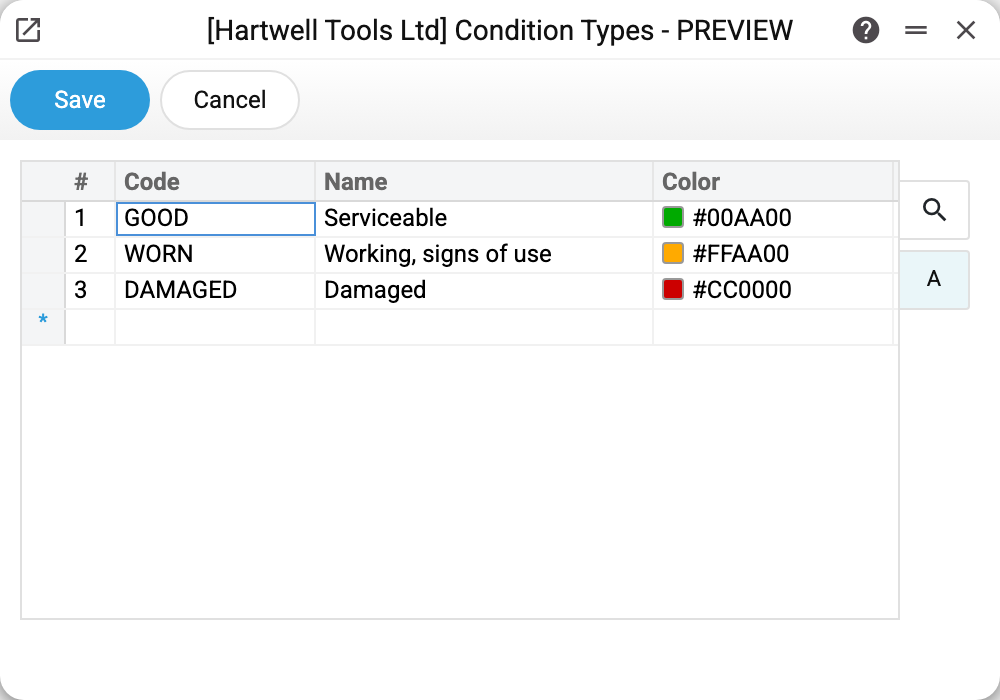
The demo company defines three:
| Code | Name | Colour |
|---|---|---|
| GOOD | Serviceable | green |
| WORN | Working, signs of use | amber |
| DAMAGED | Damaged | red |
The colour is stored on the register row, but nothing outside this window shows it: when a condition is picked on a return act, the lookup shows the code and the name.
Where they are used
The condition is picked from the register on the lines of a return act, in the "Condition" column. It does not change the unit's status by itself — that is what the separate "Target Status" field does — but it answers the question of how the machine came back.
The pair "condition + target status" is the receiver's decision: DAMAGED + MAINTENANCE means "broken, send it to the workshop", while WORN + AVAILABLE means "scuffed but working, hire it out again".
Nowhere else in rental is the condition picked from this register. The issue act and pool transfer windows have no condition field, and the "Condition" on a rental item card is free text.
The register is a hint in the lookup, not a check: a condition that is not in the register is saved as well. Acts created from a rental agreement fill the condition themselves: a return act puts GOOD, an issue act takes the condition from the item card and, if that is empty, also GOOD. So it is handy to keep a GOOD code in the register — the demo has one.
Typical situations
Your own gradations are needed. Create as many as you like: there is no limit. In practice nobody distinguishes more than five.
A condition is missing from the lookup. Check that the row was saved in this company: the setting belongs to each company separately.
A condition was changed or deleted. Acts already saved stay as they are: the condition on an act row is stored as text, so old acts keep the old code. Nor does the system stop a repeated code — two rows with the same code are both saved, so keep an eye on that yourself.
I want damaged kit routed to repair automatically. There is no automation here — a person sets the target status. The register only keeps the wording consistent.
Where to look next
- Return acts — where the condition is chosen.
- Rental items — the statuses that decide a machine's fate.
- Rental settings — the module's other parameters.