Vendor Aging Report Settings
One setting for one report: which age brackets to split vendor debt into. It is read by the vendor aging report.
Where to find it: Modules → Purchase Ledger → Settings → Vendor Aging Report Settings
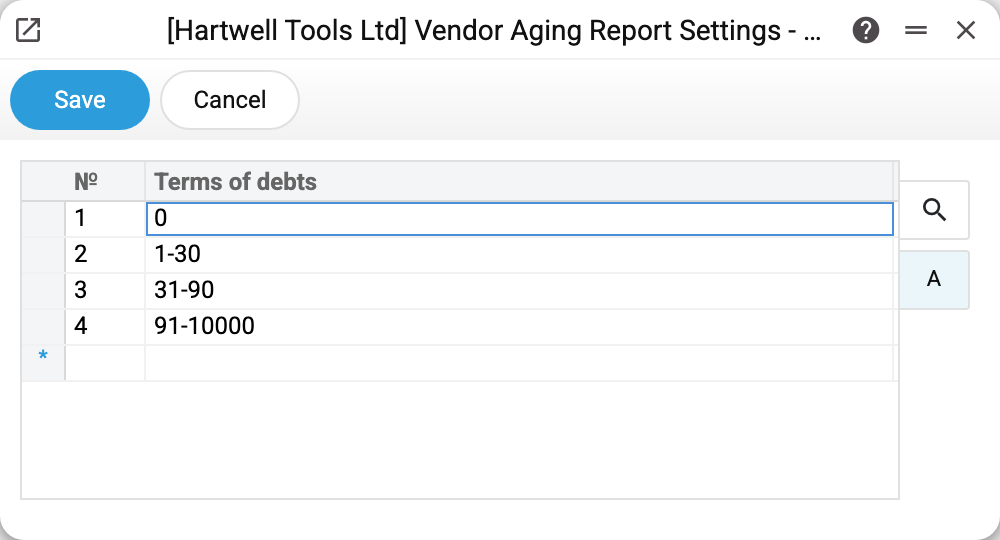
Why it is needed
A single figure of vendor debt says very little. "We owe 400 thousand" — is that trouble or a normal working state? It depends on WHAT kind of debt it is: today's deliveries that are not even due yet, or invoices overdue three years ago and forgotten.
Brackets turn the figure into a picture. You define, say, four columns — and every invoice falls into the one matching its overdue days.
How to fill it in
One column, one row — one column of the future report. A row may be:
- a range —
1-30,31-90,91-10000: invoices whose overdue days fall within these bounds, inclusive; - a single number —
0: invoices with exactly that number of overdue days.
Separate the bounds of a range with a hyphen. The report recognises no other sign: it reads
the row 0:30 as the single number 0.
The example above holds four rows: 0, 1-30, 31-90, 91-10000. The last range is
deliberately wide — it is the "everything else" bucket: a three-year-old debt has to land
somewhere. The row's text becomes the column heading.
The order of rows sets the order of columns in the report, left to right. The exception is
single-number rows (0, 91): the report always puts them first, in ascending order. The rows
1-30, 31-90, 91, 0 give the columns 0, 91, 1-30, 31-90. So put 0 in the first
row and write the rest as ranges.
What matters most
An empty setting — the report does not run. If the table is empty and the report's "Terms of debts" field is empty too, the report refuses: «Fill in the vendor aging report settings». So make the first setting before the first run of the report.
The 0 column is not "overdue by zero days". Invoices that are not due yet land there
as well: a negative figure is shown in the "Actual, days" column, but for the bracket split
the system treats it as zero. Read that column as "not overdue yet".
Gaps and overlaps are not validated. Define 1-30 and 40-90, and invoices overdue by
31-39 days fall into no column: the report shows them with zeros in the columns and their
amount in "Total". With an overlap (1-30 and 20-60) the amount lands in both columns but
in "Total" only once, so the columns no longer add up to it. Build the brackets as an unbroken
chain.
The setting is per company. In a multi-company database every company defines its own brackets and sees its own split in the report.
Common situations
The report refuses with «Fill in the vendor aging report settings». The setting is empty — fill it in, or type the brackets into the report's "Terms of debts" field, which overrides the setting.
Brackets were changed but old reports look the same. The report stores nothing: it is recalculated from scratch on every run. Simply run it again.
A different split is needed just once. Do not touch the setting: the report window has a "Terms of debts" field — whatever you type there, comma-separated, replaces the setting for a single run.