NP Types of Payers
Who pays for delivery: the sender, the recipient or a third party. Three rows — and they decide whether the customer is handed a shipping bill when collecting the parcel.
Where to find it: Modules → Nova Poshta → Registers → NP Types of Payers
The book is filled by the data download service.
Menu: Modules → Nova Poshta → Registers → NP Types of Payers.
A worked example
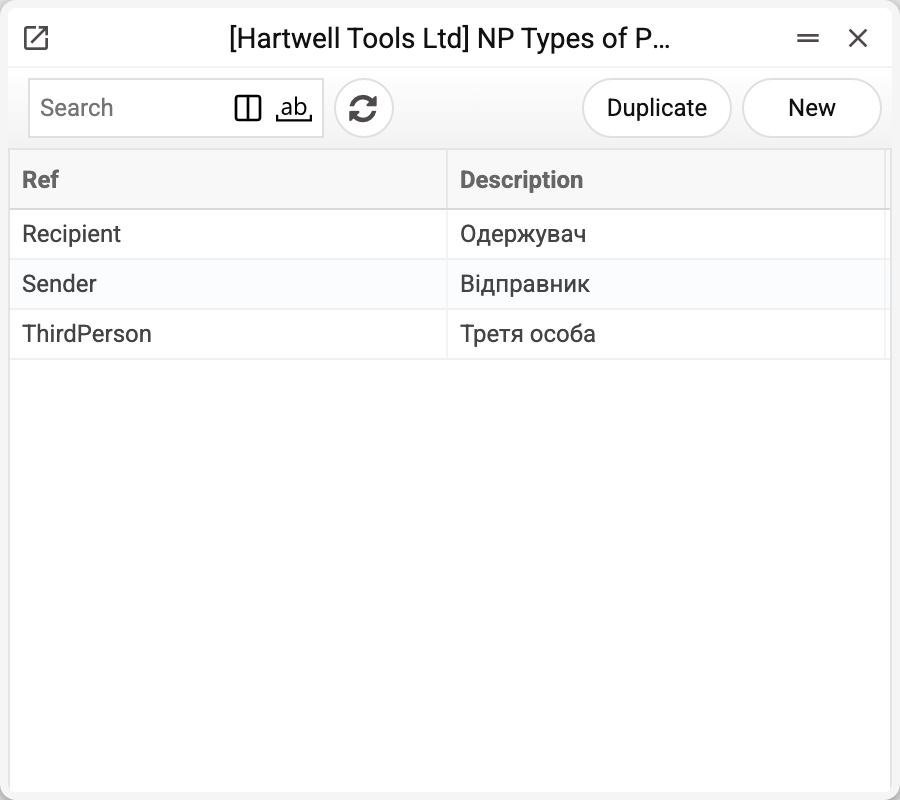
Each record has a Nova Poshta code (Sender, Recipient, ThirdPerson) and a name. Unlike cargo types, documents store the name, not the code — which is why the "Payer" field reads "Відправник" or "Одержувач".
Where a document gets its payer:
- in a sales order — from the customer's default address with the "NP Api" switch (the "Payer" field on the address card); if that is empty — a new order takes it from the cabinet card of the default sender set in NP Setting. If you change the customer or the delivery address in an open order, the payer is taken from the address again — even an empty one;
- a shipment created from a sales order takes the order's payer;
- in a shipment and a TTN, choosing the sender overwrites the payer with the "Payer" from the cabinet card — even if it came from the customer's address before;
- a TTN created from a shipment takes the shipment's payer. If the shipment has no delivery address and its payer is empty, the card of the default sender set in NP Setting fills it in; a payer that is already set stays as it is.
The payer can be changed by hand per document: wholesale customers may have delivery paid by the company, retail ones by themselves.
The cabinet card has a second field from this book too — "Payer2", the default payer of the backward delivery. When the sender is chosen in a shipment or TTN, it goes into the backward delivery payer. At present the backward delivery is not passed into the express waybill (see NP Backward Delivery Cargo Types), so this value does not reach Nova Poshta.
Where the data comes from
- Filled by the "Nova Poshta" service — by a full run or with the "Download only Types of Payers" checkbox.
- A fresh list replaces the old one within the company — only when Nova Poshta returned it. If it refused or did not answer, the book stays as it was and the service warns: "Nova Poshta data were not updated, the previously loaded records are kept: …".
Where it is used
- Nova Poshta — the default "Payer" and "Payer2" on the cabinet card
- Addresses, Sales Orders, Shipments, TTN — the payer of a particular shipment
Fields
| Field | Description |
|---|---|
| Ref | Nova Poshta's code: Sender, Recipient, ThirdPerson |
| Description | The name stored in the document |
Nearby
- NP Types of Payers for Redelivery — who pays for the money travelling back
- NP Backward Delivery Cargo Types — what travels back
- Nova Poshta data download — the service that fills the book
Print variables
Values available in this document's printed form templates. How to write a variable in a template — see Print Forms.
Header fields:
| Variable | What it holds |
|---|---|
| NPPayType_Ref | Ref |
| NPPayType_Desc | Description |