Contacts
A single register for everyone the company deals with: customers, vendors, contact persons and prospects. There are no separate «customers» and «vendors» registers — there is one list, and the role is set by the checkboxes in the card header.
Where to find it: Modules → CRM (the item is present in other modules too) → Registers → Contacts
A contact card is not a form filled in for tidiness — it is the source of terms the system uses to fill documents: where to take the price from, how many days to wait for payment, which currency to invoice in, which VAT rate to apply, which depot to ship to. Fill the card once, and from then on the salesperson only picks the customer while everything else is substituted automatically.
Example walkthrough
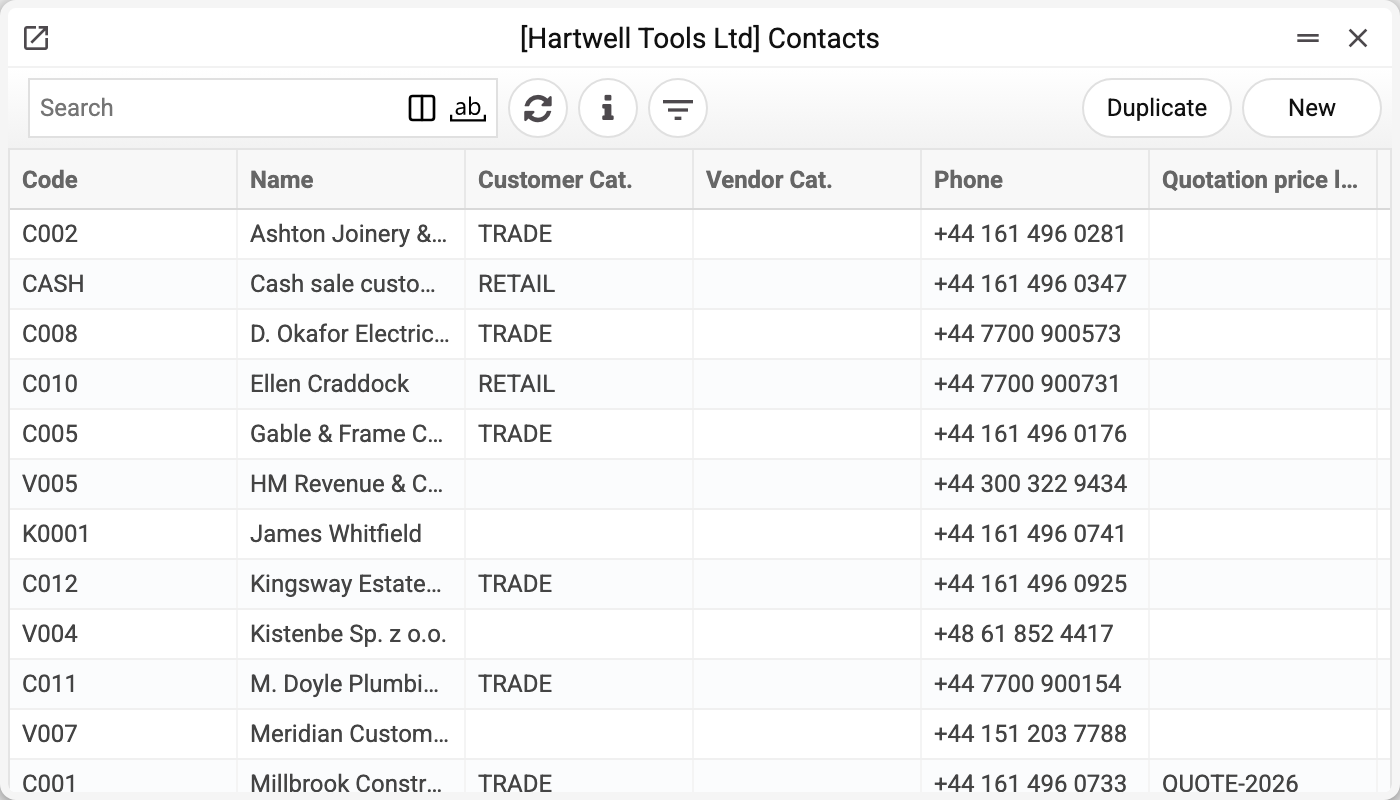
The list shows the code, name, customer and vendor categories, and phone. The filter button opens selection by category, classification, residency and type: customers only, vendors only, contacts only, VIP only.
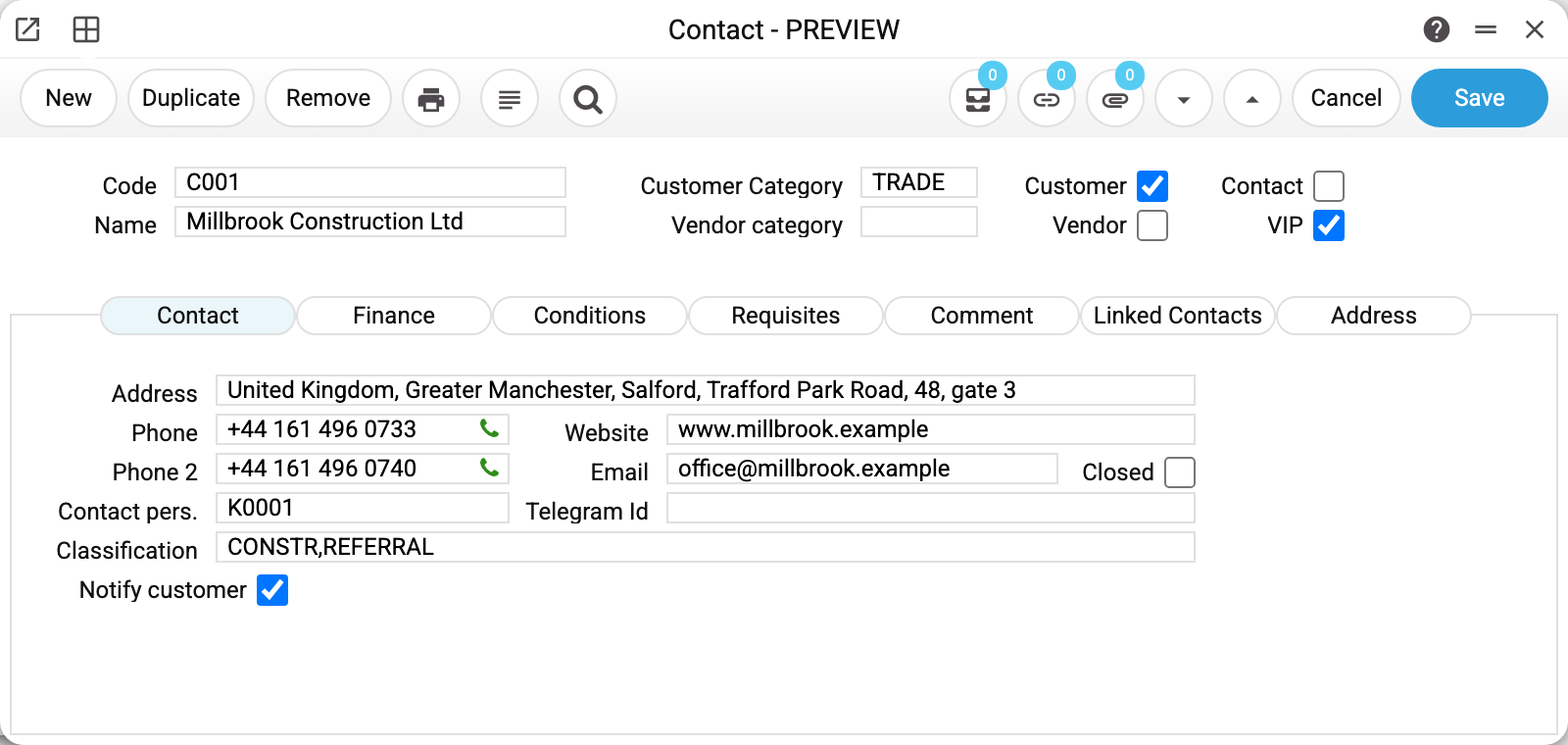
This is the card of Millbrook Construction Ltd — the customer we invoiced and received payments from.
The header answers the main question: what this contact is. «Customer» and «VIP» are ticked, «Vendor» and «Contact» are not. At least one of «Customer», «Vendor», «Contact» is mandatory («VIP» alone does not count): without it the card will not be saved and the system replies «You must select a contact type». The same company may be both a customer and a vendor — then it appears in sales and in purchasing, and a second set of terms fields shows up for the vendor role.
Customer category (TRADE) is not a description but a reference to a category that carries the price list, discount matrix and receivables account. A category hands out terms to a whole group of customers at once.
The «Contact» tab holds what is used daily: phones, e-mail, website, contact person and classification. Two fields deserve a closer look:
- «Address» contains the line «Millbrook Construction Ltd, United Kingdom, Greater Manchester, Salford…» — nobody typed it. It is the representation of the delivery address marked «default»: the address was saved and the system rewrote the field on the card;
- «Classification» holds two comma-separated values — CONSTR and REFERRAL. These are contact classifications: industry and acquisition channel. The field is multi-valued.
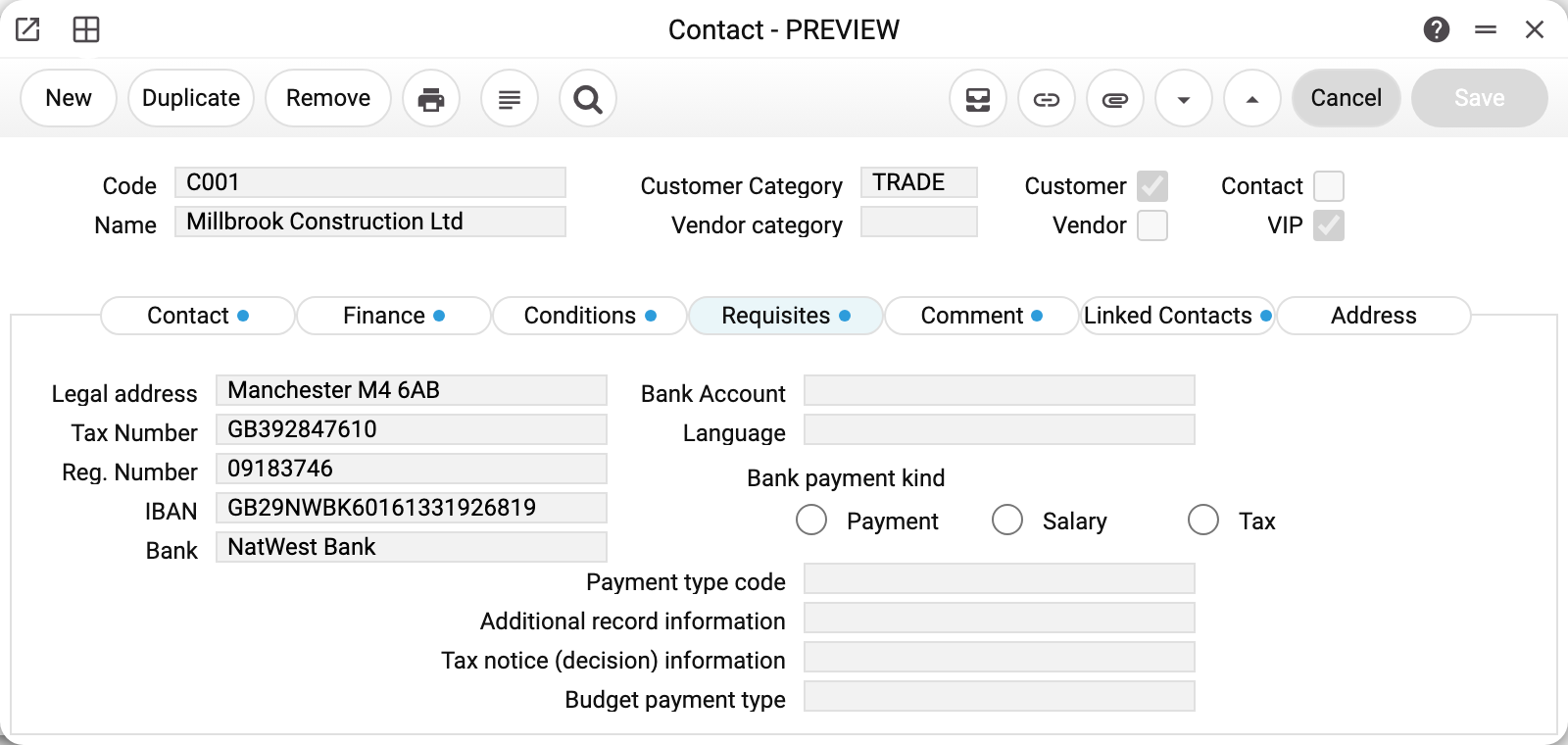
The «Requisites» tab holds what goes into print forms and tax documents: legal address, tax number, registration number, IBAN and bank. The legal address was filled in automatically too — from the address of type «Legal» marked as default.
In the Ukrainian version of ERPJS the tab also has bank payment fields — for sending vendor payments to Ukrsibbank: «Bank payment kind» (Payment, Salary or Tax), and for a tax payment — «Payment type code» and «Additional record information» (the bank takes it when the payment row has no purpose). The bank identifies the recipient by IBAN and registration number, and when the registration number is empty — by the tax number. The «Tax notice (decision) information» and «Budget payment type» fields are stored but do not go to the bank yet.
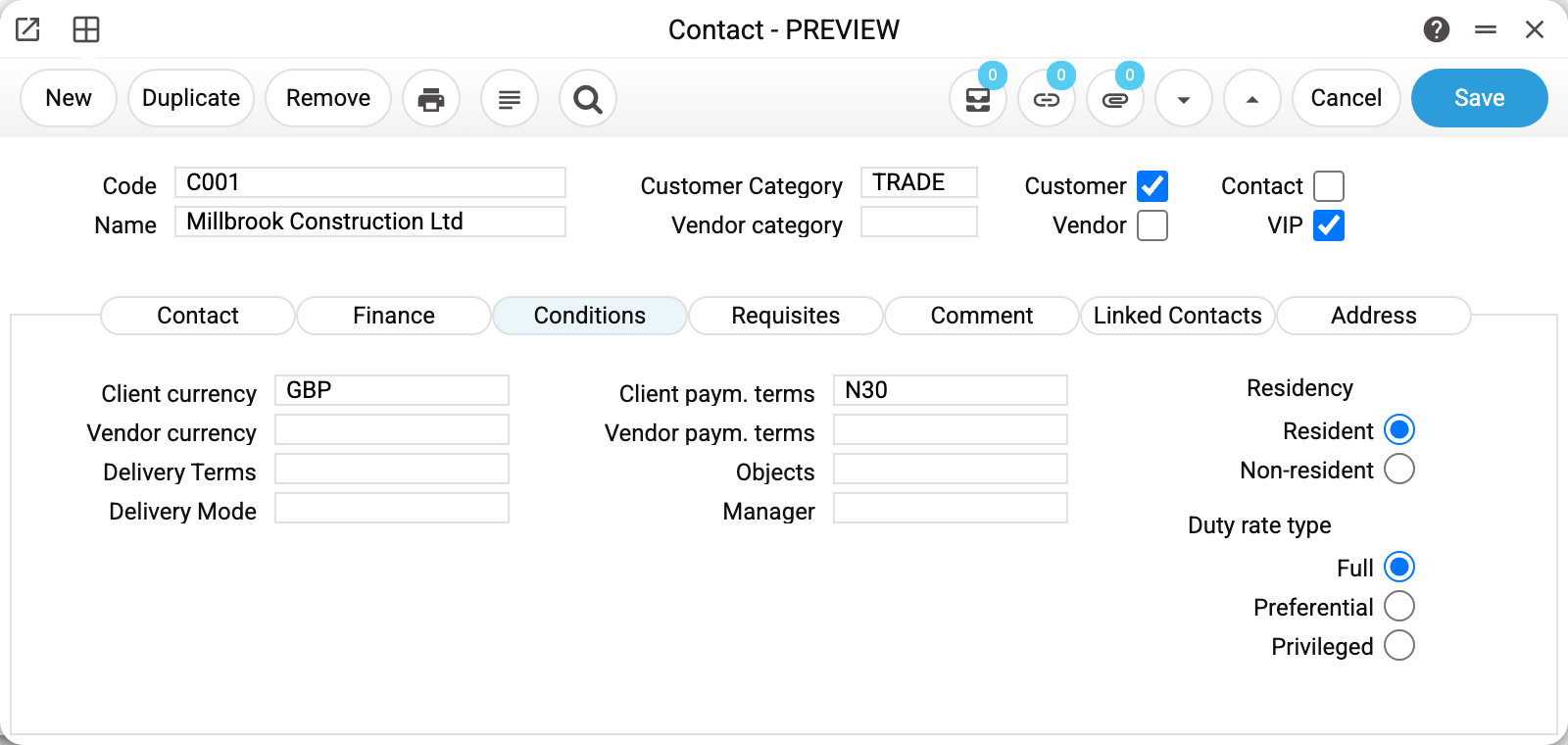
The «Conditions» tab holds what was agreed with the customer:
| Field | What it drives |
|---|---|
| Client currency | Currency of new invoices and orders for this customer |
| Client paym. terms | Due date of an invoice = invoice date + days from the payment terms; with "from end of month" terms — end of the invoice month + days (with 0 days — end of the following month) |
| Delivery terms / mode | Substituted into the sales order and the invoice when the customer is picked; changing the customer brings its values, empty ones too |
| Objects | The analytical object the postings for this contact are booked to |
| Manager | The person responsible; sales reports can be filtered by them. They are also put into the "Salesman" field of this customer's new sales orders, invoices and quotations, whoever enters them; the field can be changed by hand |
| Residency | Resident or non-resident — this decides whether a purchase goes straight to stock or through customs clearance |
| Duty rate type | Full, reduced or preferential — for import operations |
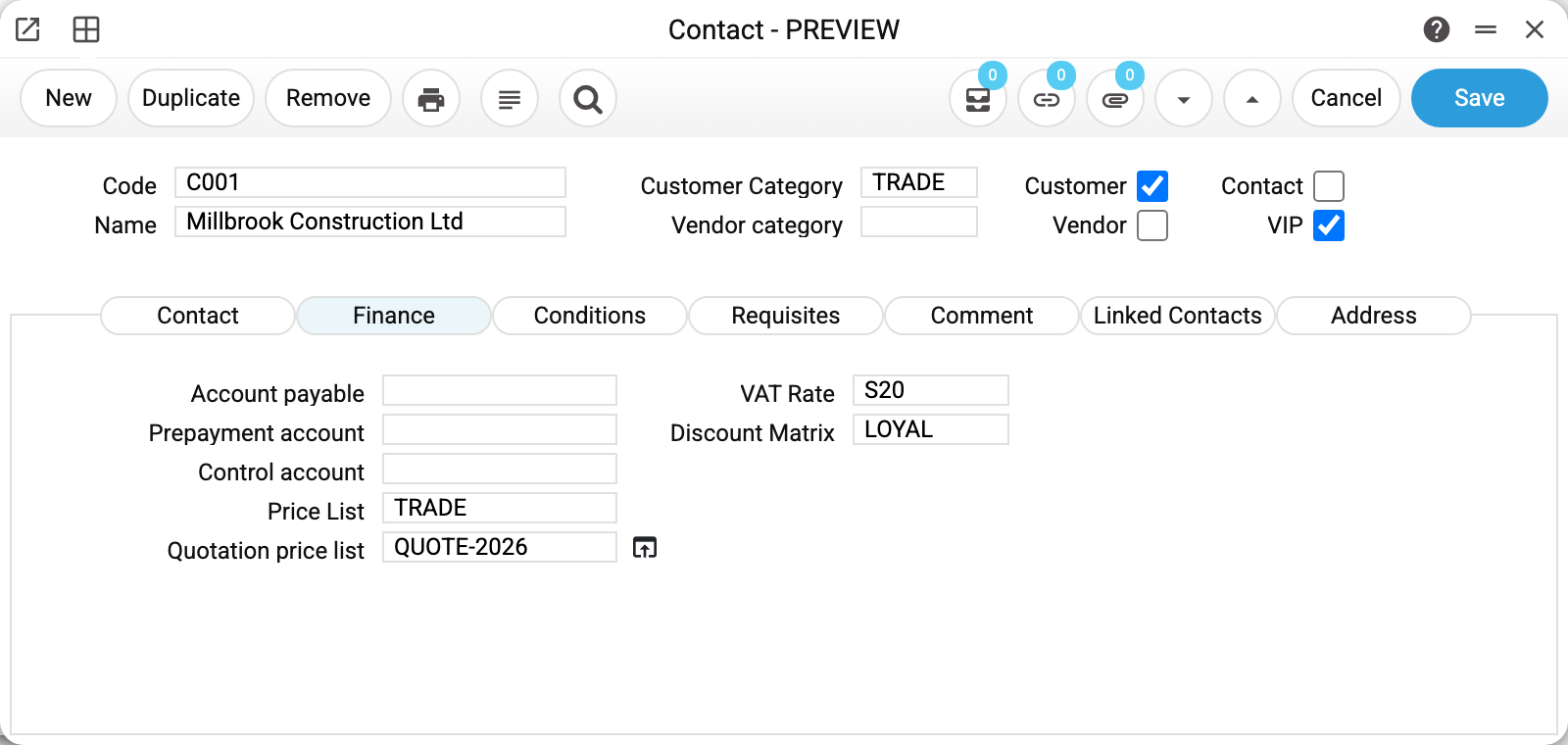
The «Finance» tab answers «at what price and to which account». The price list (TRADE) is the key field: the invoice price comes from the customer's price list, not from the item card. The discount matrix (LOYAL) adds a discount on top, the VAT rate is substituted into document rows, and the payables and prepayment accounts are used when the contact acts as a vendor.
Next to the quotation price list there is an icon: it opens a web showcase with the prices for this very customer (the link carries their identifier). The link can be sent to the customer so they browse their own prices.
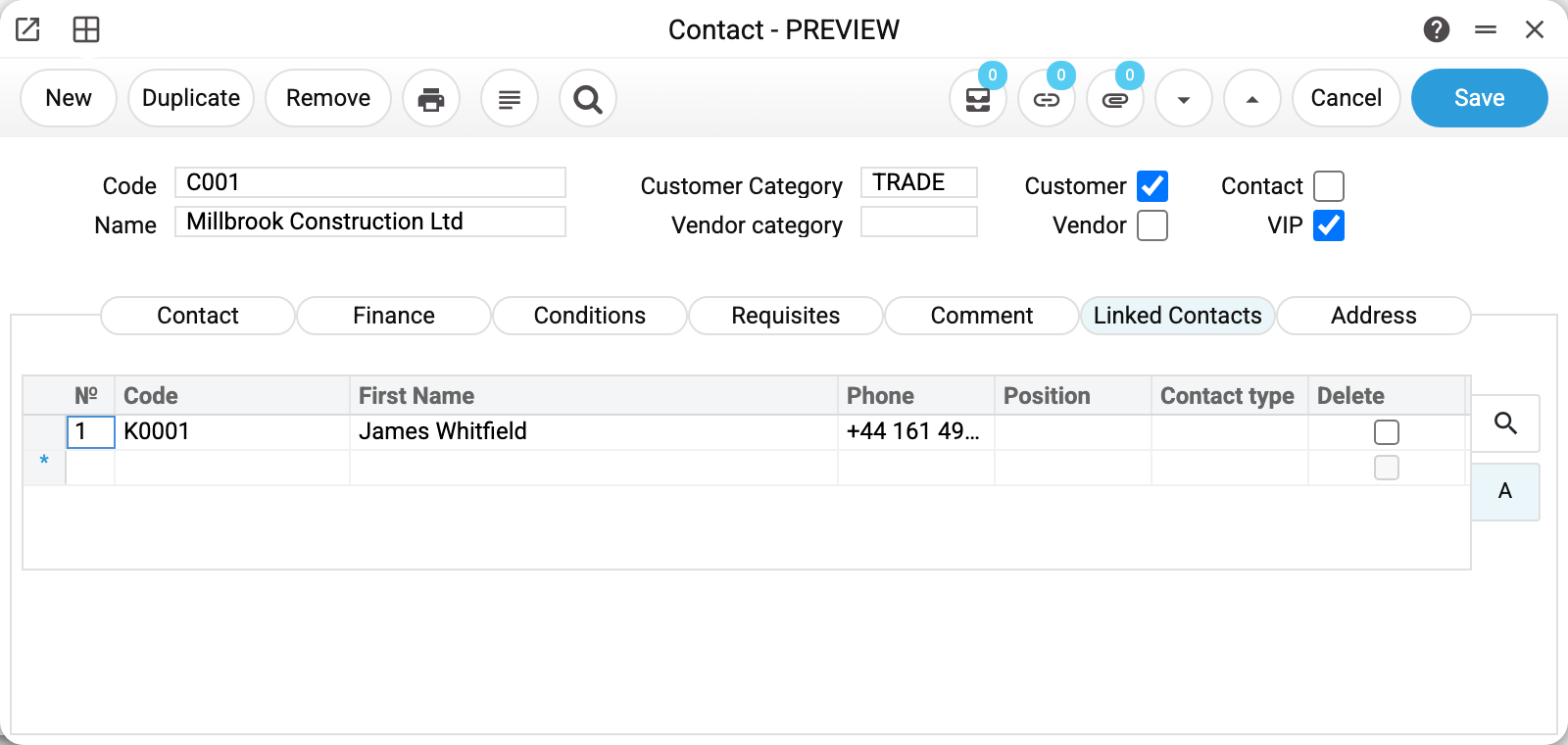
The «Linked Contacts» tab lists people on the customer's side. James Whitfield has his own card (type «Contact») linked to the company. The link works both ways: his card shows Millbrook Construction Ltd in the same table. The «Delete» tick in a row breaks the link — it does not remove the person from the system.
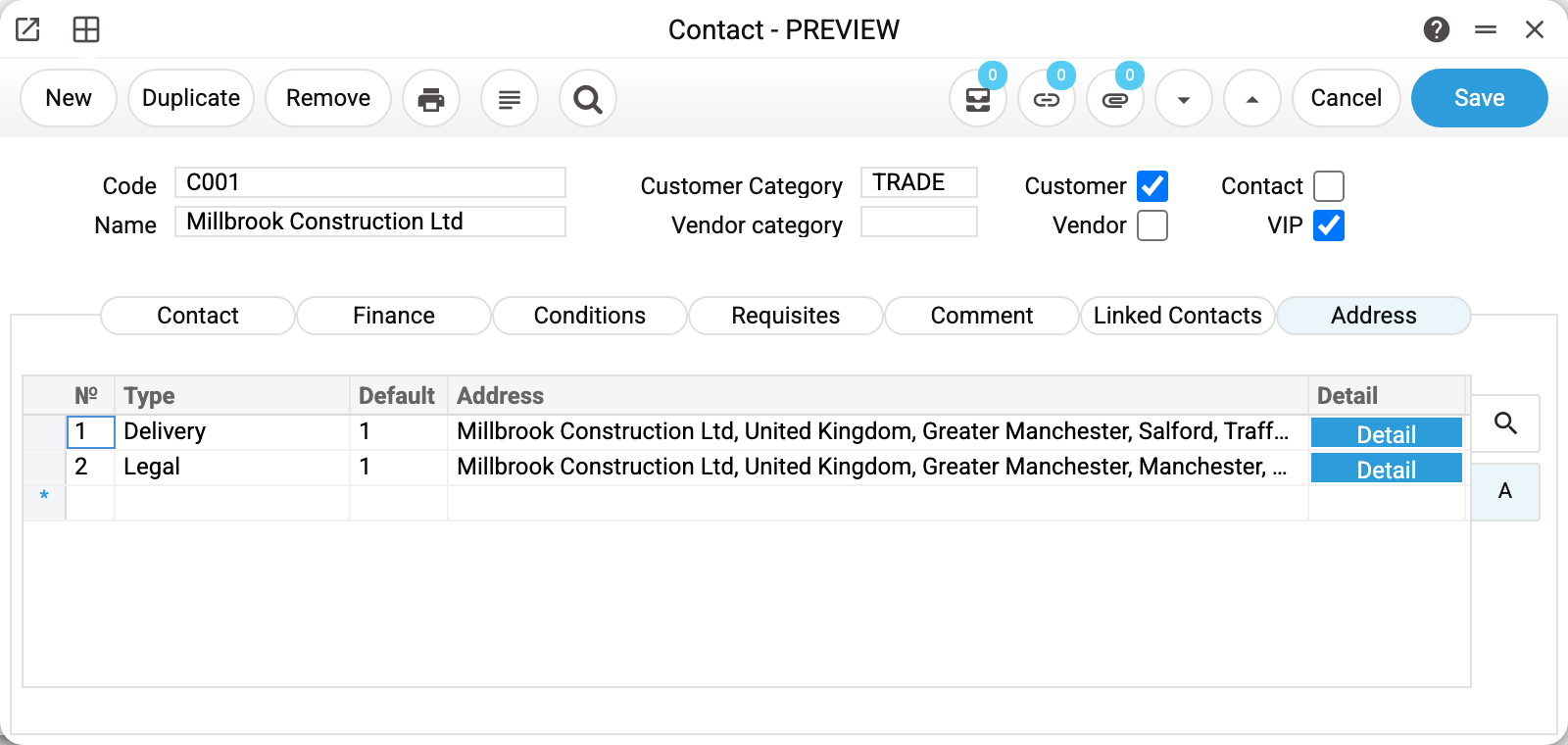
The «Address» tab lists every address of the contact — legal, postal, delivery. Those marked «default» come first; they are the ones that reach documents.
Where the code comes from
The code can be typed in, or left empty — then the system issues the next free one from the number ranges, picking the range that best matches the contact type and category. In our example the contact person K0001 and the lead K0002 got their codes from the «generic» range: they are neither customers nor vendors, so the dedicated ranges did not apply.
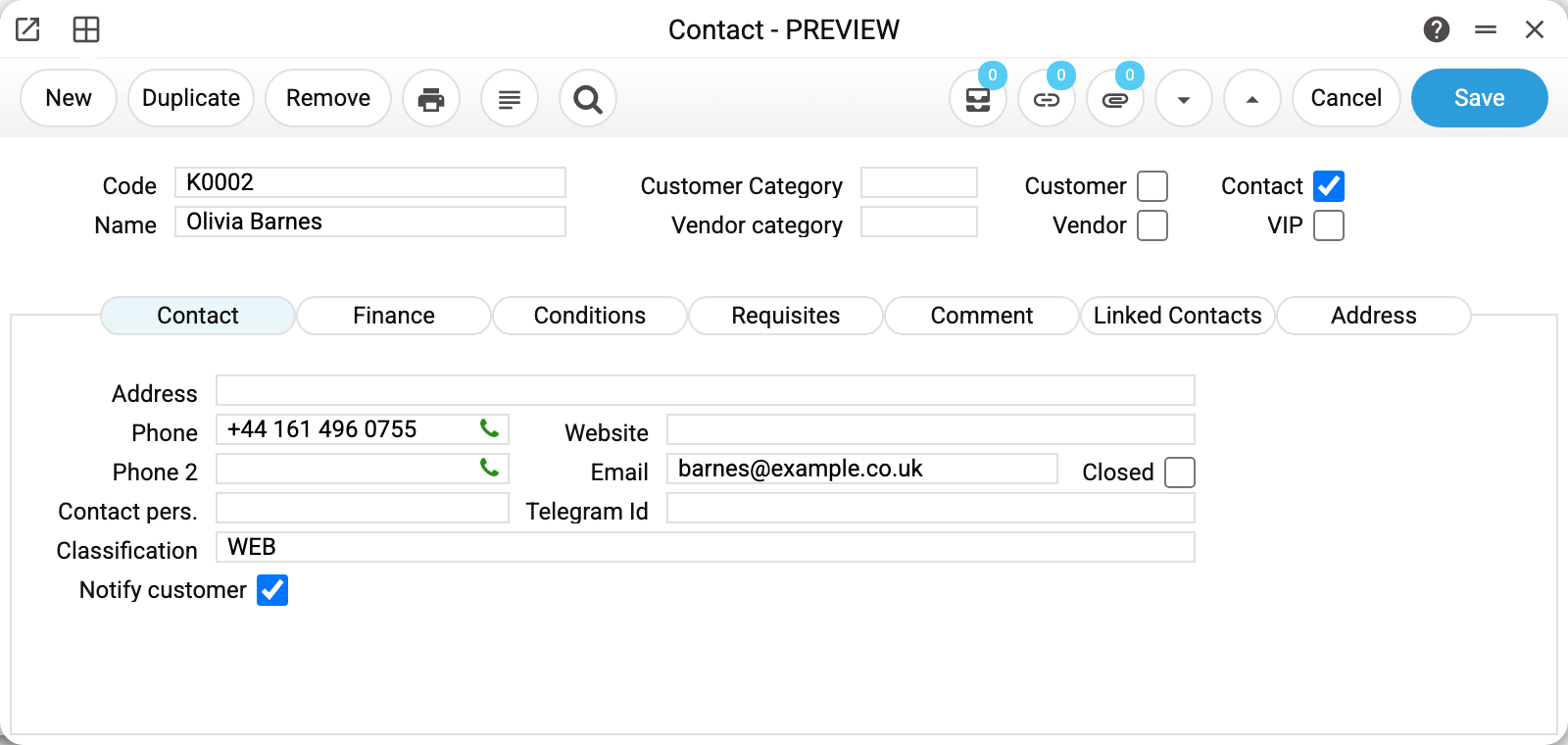
The lead K0002 card has only «Contact» ticked — neither «Customer» nor «Vendor»; the WEB classification is the channel it came through.
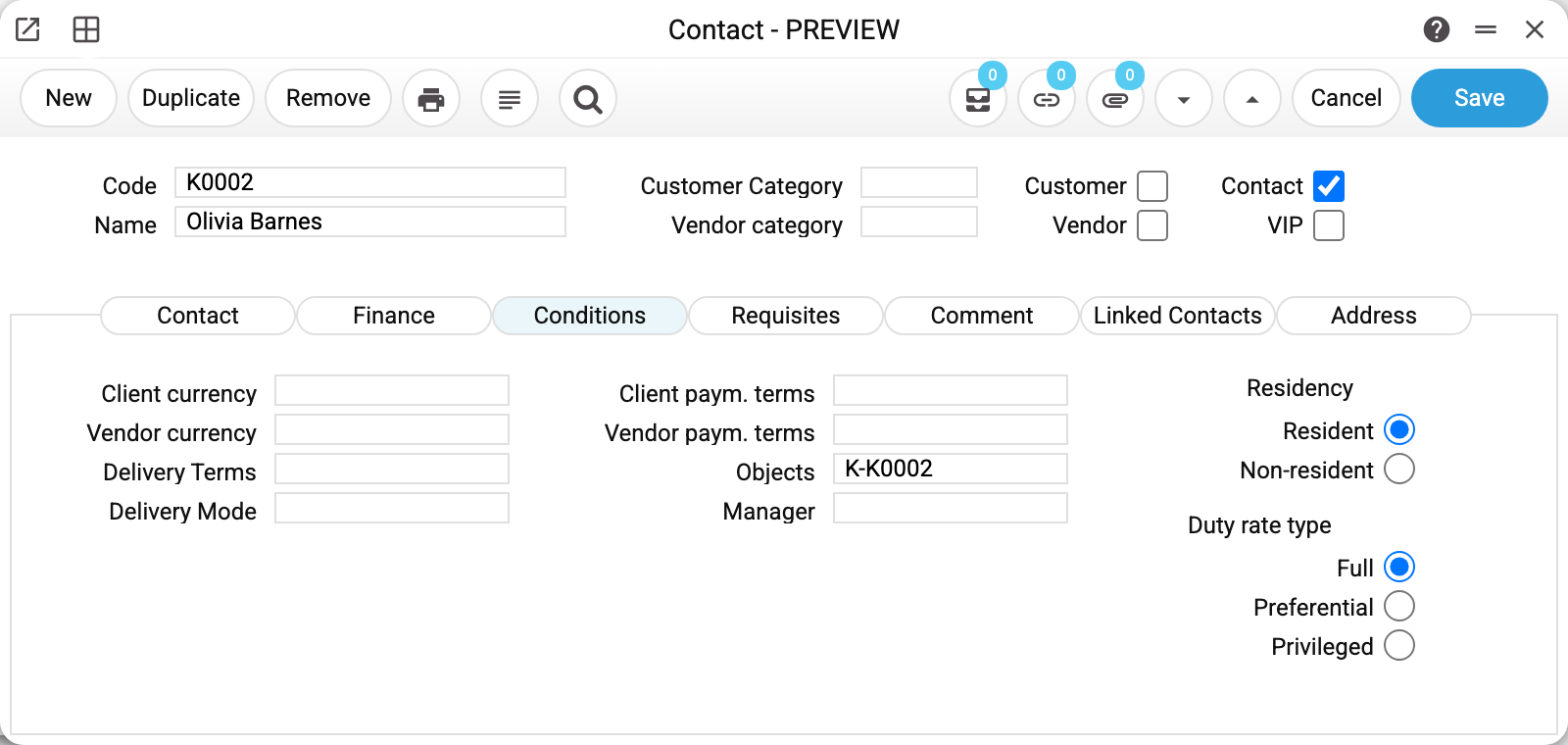
The lead K0002 has the «Objects» field filled in — the analytical object K-K0002 was created automatically because the contacts setting says so. From now on every posting for this contact can be broken down by object.
What is checked on save
Code and name are mandatory. The code is unique within the company: «This code is already registered in the system».
The phone is checked for duplicates — across both fields. If the number already belongs to another contact (either in «Phone» or in «Phone 2»), the system names the existing card: «Contact with this phone number (+44 161 496 0733) is already registered: C001». This guards against a second card for the same person — the most common cause of «the customer paid but the debt is still there». The phone can be made mandatory in the system settings (see Phone Number Config).
Reference fields are verified: category, classification, price list, payment terms, currency, discount matrix, accounts, manager, contact person. The error names the exact value — «Price List 'TRADE2' is not found».
Objects must not repeat by type: two objects of the same type on one contact are forbidden, and a closed object cannot be selected.
What a contact does in documents
Supplies the terms. Pick a customer on an invoice and the price list, discount, currency, VAT rate and payment terms arrive — and with them the due date.
Collects the debt. All invoices, payments and prepayments are matched by contact code — this is what feeds the settlements statement and the aging report.
Allows or blocks messaging. The «Notify customer» tick is the consent for SMS mailings: without it the messaging service skips this contact. Service order status notifications (such as «Ready») ignore the tick — they reach the order's customer without it.
Closes the relationship. The «Closed» tick blocks the contact: it stays in the database and in old documents, but cannot be picked in new ones. In sales documents — invoice, credit note, sales order, quotation, shipment, return — a closed customer cannot be entered by typing the code either: a new document for them will not save, and they cannot replace the customer of an existing document. Documents that already carry the customer are edited and closed as before. A new invoice or shipment made from such a customer's order is a new document: it will not save until the customer is reopened.
Refuses to be deleted. If the contact is used in at least one document, deletion is rejected with a list: «Contact code used in documents: Invoices, Sales Orders!». A "document" here is any record holding the contact code — not only invoices and orders but also contracts, agreements, tasks, rental agreements and acts, customs clearances, addresses, the contact person of a project or of another contact, and the default customer in the invoice settings and on a user card — receipt imports from Checkbox and Vchasno.Kasa take the latter. The proper way to retire a customer is the «Closed» tick.
Card menu
| Item | What it does |
|---|---|
| Customer Information | A report on this customer: contacts, terms, documents, debt |
| Vendor information | The same from the purchasing side |
| Create address | A new address record with the contact already filled in |
| Create a linked contact | A new card linked to the current one straight away |
| Contact Change History | Who changed what on the card |
Typical situations
The card will not save: «You must select a contact type». None of «Customer», «Vendor», «Contact» is ticked («VIP» alone sets no type) — the system does not know whether this is a customer, a vendor or a contact person.
The system says the phone is already registered. Such a contact exists — its code is in the message. Find it and work with it instead of creating a second one.
The invoice shows the wrong price. Check the «Finance» tab: the customer's price list outranks the item card. If the customer has none, the customer category's price list is used. If the category has none either, the price list of the customer's payment terms applies when the terms have one: it replaces whatever the invoice had. When the terms have none either, the invoice keeps the price list it already has; an empty field is filled with the user's default price list (a new invoice gets it as soon as it is created). The item card price is used only when the chosen price list has no row for the item. A zero in the price list is a price: the item comes in at 0 and the card price is not substituted.
The address on the card changed by itself. That is by design: a delivery (or legal) address marked «default» rewrites the matching field on the card when the address is saved.
A branch of the same company is needed. Create a separate contact and link it to the head office via «Create a linked contact» — documents will be split by branch while the link stays visible.
The contact cannot be deleted. It is already in documents. Tick «Closed» instead — it will no longer appear in new documents.
Displaying Barcodes in Print Forms
The system provides the ability to output a contact's barcode in print forms.
Important! To ensure the barcode displays correctly in the document (Word/Excel) as bars instead of special characters, the font Libre Barcode 128 must be installed on the computer.
Download link: https://fonts.google.com/specimen/Libre+Barcode+128
Print variables
Values available in this document's printed form templates. How to write a variable in a template — see Print Forms.
Header fields:
Main
| Variable | What it holds |
|---|---|
| Contact_Code | Code |
| Contact_Name | Name |
| Contact_Phone1 | Phone |
| Contact_CustCat | Customer Category |
| Contact_VendCat | Vendor category |
| Contact_Customer | Customer |
| Contact_Vendor | Vendor |
| Contact_Leader | Contact |
| Contact_VIP | VIP |
| Contact_Phone2 | Phone 2 |
| Contact_Residency | Residency |
Comment
| Variable | What it holds |
|---|---|
| Contact_PersonPosition | Position |
| Contact_Comment | Comment |
Contact
| Variable | What it holds |
|---|---|
| Contact_Address | Address |
| Contact_Email | |
| Contact_ContactPerson | Contact pers. |
| Contact_Classification | Classification |
| Contact_Website | Website |
| Contact_Closed | Closed |
Finance
| Variable | What it holds |
|---|---|
| Contact_AccountPayable | Account payable |
| Contact_VATRate | VAT Rate |
| Contact_PrepaymentAccount | Prepayment account |
| Contact_DiscountMatrix | Discount Matrix |
| Contact_ControlAccount | Control account |
| Contact_PriceList | Price List |
| Contact_QuotationPriceList | Quotation price list |
Requisites
| Variable | What it holds |
|---|---|
| Contact_LegalAddress | Legal address |
| Contact_TaxNumber | Tax Number |
| Contact_RegNumber | Reg. Number |
| Contact_IBAN | IBAN |
| Contact_Bank | Bank |
| Contact_BankAccount | Bank Account |
| Contact_Lang | Language |
Conditions
| Variable | What it holds |
|---|---|
| Contact_Currency | Client currency |
| Contact_VendorCurrency | Vendor currency |
| Contact_DeliveryTerms | Delivery Terms |
| Contact_DeliveryMode | Delivery Mode |
| Contact_PaymentTerms | Client paym. terms |
| Contact_VendorPaymentTerms | Vendor paym. terms |
| Contact_Objects | Objects |
| Contact_Manager | Manager |
Other variables
| Variable | What it holds |
|---|---|
| Contact_DutyRateType | Duty rate type |
| BAR128_Contact_Code | Barcode of the contact card in CODE128: the record type and number, encoded, by which the system finds the card when it is scanned. It does not contain the contact code (C0004) — use Contact_Code for that |
Row fields:
| Variable | What it holds |
|---|---|
| MNo | Row position number |