Nova Poshta
Cities, branches, regions, cargo types, packaging — none of that lives in your database; it lives at Nova Poshta. This service goes and fetches it, filling the module's reference books. Until it has run, the fields of the cabinet card and of the documents have nothing to offer.
Where to find it: Modules → Nova Poshta → Maintenances → Nova Poshta
Menu: Modules → Nova Poshta → Maintenances → Nova Poshta.
A worked example
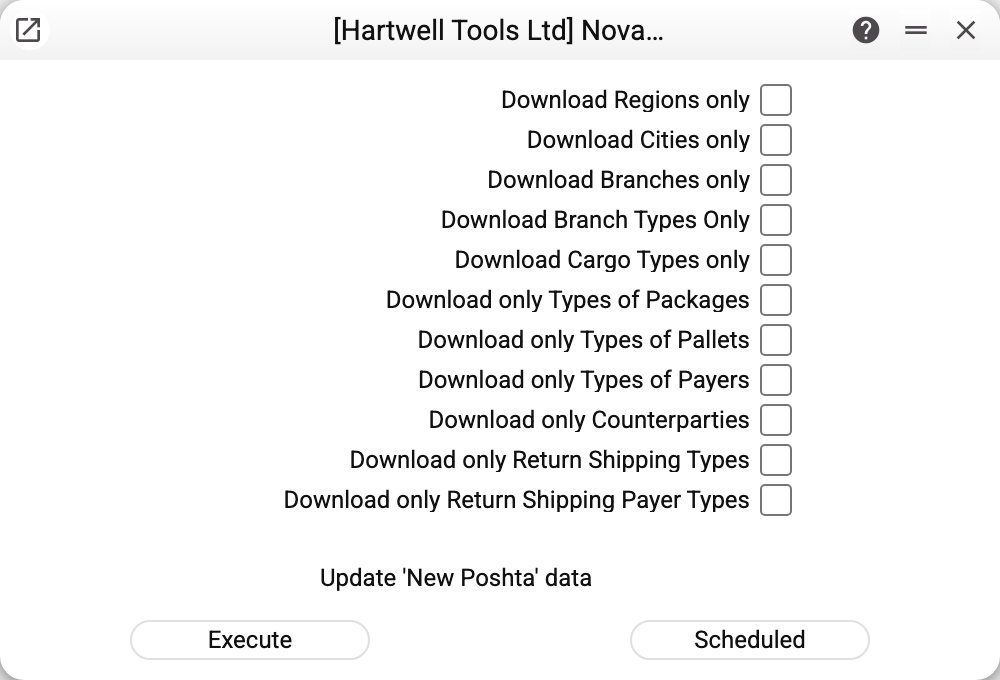
Eleven "Download only …" checkboxes are a filter on how much work to do. The rule is simple: with none of them ticked, everything is downloaded — regions, cities, branches, branch types, cargo types, packaging, pallets, payer types, return cargo types, return payer types and counterparties. Tick one, and only that one is done.
This is not an interface whim but a way to avoid waiting an hour for nothing. Nova Poshta has tens of thousands of branches, delivered page by page, and over ten thousand cities. The other books are a handful of rows that load instantly. Hence the usual pattern: run it in full once, then refresh selectively — cities separately, branches separately.
Two buttons at the bottom: Execute starts it now, Scheduled hands it to the task scheduler. The service is normally scheduled once a day at night: Nova Poshta's addresses change slowly, but they do change.
Where the data comes from
- The service takes the key from the Nova Poshta register — from the first record. If the first record holds no key, the run stops with a message that the key must be specified — even when other records have one.
- Counterparties are the exception: they are collected across every cabinet card that holds a key, because each cabinet has its own address book. A card without a key is skipped.
- A reference book is replaced only when Nova Poshta has returned all of it: before writing, it is cleared within your company and refilled straight away. Other companies' data is left alone. If Nova Poshta refuses, does not answer or returns fewer warehouses than it named itself, the book stays as it was.
- Packaging is the exception: the service replaces only the packages that came from Nova Poshta (by code). Ones added by hand stay — and so do the ones Nova Poshta has since withdrawn: delete those yourself.
- The books are filled with the names Nova Poshta returns — in Ukrainian. So even with the interface in Russian or English the cities and branches are Ukrainian: that is the content of the book, not a translation error.
What ends up in the reference books
| Reference book | What it brings |
|---|---|
| NP Areas | Regions of Ukraine |
| NP Cities | Settlements, each tied to a region |
| NP Warehouses | Branches and parcel lockers with numbers, addresses and weight limits |
| NP Warehouse Types | Postal branch, cargo branch, parcel locker |
| NP Cargo Types | Parcel, cargo, documents, pallets, tyres and wheels |
| NP Pack List | Boxes and bags with their dimensions |
| NP Pallets List | Pallet sizes |
| NP Types of Payers | Sender, recipient, third party |
| NP Backward Delivery Cargo Types | Money transfer, documents |
| NP Types of Payers for Redelivery | Who pays for the return delivery |
| NP Counterparties | Recipients and third parties from your cabinet |
Common situations
- "Nova Poshta data were not updated, the previously loaded records are kept: …" — Nova Poshta refused or did not answer. After the colon the message names which reference books stayed unchanged and why: Nova Poshta's refusal text or a connection error, and for counterparties also the cabinet. The key has expired or been revoked — create a new one in the Nova Poshta Business Cabinet and replace it in the cabinet card. The connection dropped — simply run it again.
- "Invalid Api key!" — this is the answer when saving a cabinet card: Nova Poshta rejected the key you typed. Check that it was copied in full.
- The service takes a very long time. Most likely it is loading branches: tens of thousands of them, arriving page by page. If you only need cities, tick "Download Cities only".
- The second company's books are empty. Every company keeps its own copy, and the service works in the company you are currently in. Switch to the company you need and run it there.
- The service refuses, naming the book: it is shared from another company, and only that company runs this maintenance. The selected NP book is shared into this company from another one: its records belong to the main company, so the service run there updates them. The refusal comes before the first request to Nova Poshta, and nothing is changed.
Nearby
- Nova Poshta — the cabinet card holding the key
- NP Setting — the module switch
- Waybill status update — the module's other service: it tracks shipments
- Task scheduler — how to put a service on a schedule