Balance Presentation
The sign setting for the "Analytical Balance" report. The report prints each account's balance by its account type: for Asset and Expense accounts it is debit minus credit, for Liability, Equity and Income accounts it is credit minus debit. So the normal balance of any account prints with a plus, and a balance on the "wrong side" prints with a minus. Here you can flip the sign for whole account classes: tick a class and its balances print with the opposite sign.
Where to find it: Modules → Nominal Ledger → Settings → Balance Presentation
Walkthrough
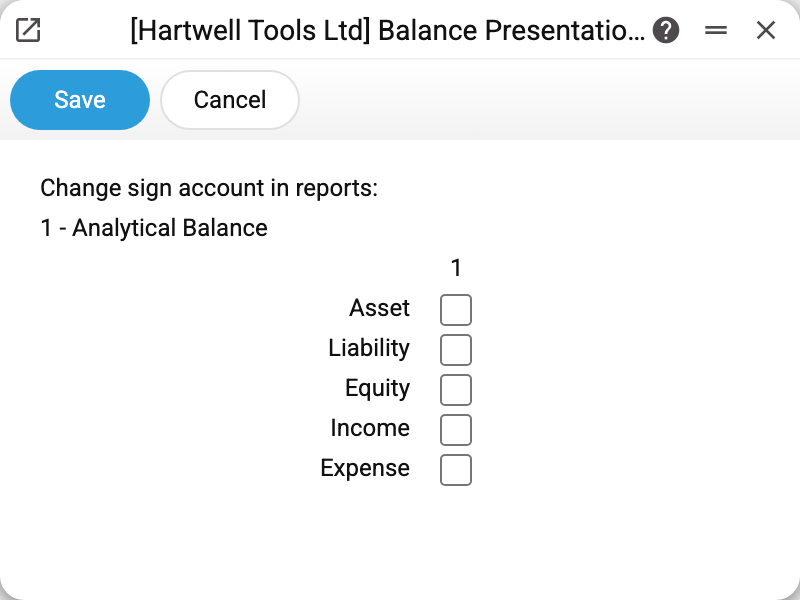
Five rows — five account classes (the class is set in the account card, the "Account type" field):
- Asset — cash, bank, stock, receivables;
- Liability — suppliers, loans;
- Equity — share capital, profit;
- Income — class 7 accounts;
- Expense — classes 8 and 9.
Column "1" belongs to the "Analytical Balance" report — the only report that reads this setting.
In the demo all boxes are unchecked: balances print with the sign of their account type. Share capital on an Equity account has a credit balance and prints as a positive number. Tick "Equity" and the same line turns negative.
How to think about the ticks
With no ticks the sign is the "balance sheet" one: assets, liabilities, equity and income with their normal balances are positive. A minus means the balance sits on the side its type does not expect: a Liability account with a debit balance (an overpaid supplier) prints negative. The equation here: the Asset and Expense lines add up to the Liability, Equity and Income lines.
The "mathematical" sign — debit balance plus, credit balance minus — comes from ticking "Liability", "Equity" and "Income". Normal credit balances then turn negative, an overpaid supplier turns positive, and all lines of the report sum to zero.
A tick flips the WHOLE class — in all three columns: "From Val", "Change" and "To Val".
Worth knowing
- The setting is purely cosmetic: it changes how figures are printed in the "Analytical Balance" report and nothing else. Transactions, the trial balance, the ledger and the financial statements do not read it.
- The report has no total line or column: you check the equation above yourself by adding the lines up.
- The sign by type comes from the card's "Account type" field. An account with no type prints as debit minus credit, and the ticks do not affect it.
- The change is visible on the next report run — nothing needs recalculating.
- A new company in a multi-company database gets this setting empty — its report prints the sign by account type, as with all boxes unchecked.
- The window has a single column of ticks; room for a second and third (for other reports) is reserved in the product but not used yet.
Common situations
Equity shows negative in the Analytical Balance — is that a bug? With no ticks, a negative equity line is worth checking: either the account really has a debit balance, or the account card has the wrong "Account type" (Asset instead of Equity, say). If "Equity" is ticked, the minus is simply the sign of a credit balance.
A supplier account shows a minus. With no ticks this is a debit balance on a liability account — an overpaid supplier. With "Liability" ticked it is the other way round: debts to suppliers print negative, an overpayment positive.
Will this affect the turnover balance sheet? No. The trial balance always shows debit and credit in separate columns; it needs no sign.