Export archive for Medok
The service gathers the VAT invoices of a period into XML files in the format M.E.Doc expects and hands them over as a single zip archive. From there the archive is imported into M.E.Doc, signed and submitted to the state register — the system itself sends nothing.
Where to find it: Modules → Sales Ledger → Maintenances → Export archive for Medok
How it works
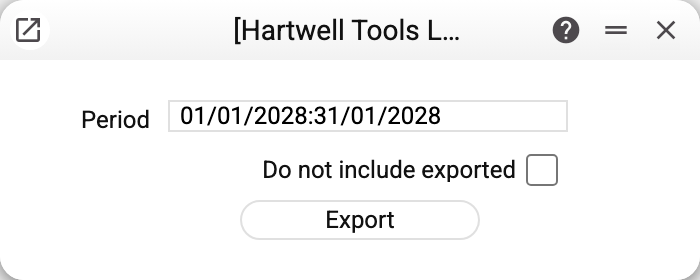
Two fields and a button:
- Period — by VAT invoice date;
- Do not include exported — skip the documents already exported once;
- Export — builds the archive and hands it straight to the browser:
MedokExport<date>.ziplands in the downloads folder.
Every APPROVED document of the period becomes its own file (approve a draft first — otherwise it does not get into the archive): a VAT invoice follows the J1201014 schema, an adjustment calculation the J1201214 schema. The file name is assembled the way the tax authority requires: region code, district code, the company's registration number (EDRPOU), document code, its version, the document's sequence number (the invoice's official number, "Of. Ser. Number", stands in its place), the period and the tax office code. The encoding inside is windows-1251, as M.E.Doc requires.
The quantity in an XML row is not taken from the VAT invoice row. The system divides the amount without VAT by the price rounded per the rounding setting and writes the result. When the amount does not divide by the price evenly, the file carries a fractional quantity: 100.00 UAH for 3 pcs gives a price of 33.33 and a quantity of 3.0003… Check the quantities in M.E.Doc before submitting. A row with zero quantity gives NaN in both price and quantity.
Only users with the edit right on "VAT Invoices Issued" can export: the service sets a mark on the invoices. Without the right — "Permissions denied".
The system ticks Exported on the VAT invoice as soon as the server has built the files — before the browser saves the archive. That is exactly what the "Do not include exported" box relies on next time.
What to fill in BEFORE the first run
- on the company card — the region number, the district number and the registration number: both the tax office code and the file name are built from them. Without them nothing is produced: "Fill in the region number, district number and registration number in the company card";
- the unit and the VAT rate on every VAT invoice row — without them the archive is not produced at all, and the refusal names the document and the row: "VAT invoice …, row …: unit of measure is not filled in or is missing from the register" (likewise for the VAT rate);
- the original VAT invoice of an adjustment — without it the adjustment is not exported: "VAT invoice …: original VAT invoice for the adjustment was not found";
- the commodity code — it is copied from the item into the VAT invoice row when the invoice is created. So fill it in on the item BEFORE the invoice is created, and in an existing invoice — in the row itself;
- the customer in "Contacts" and the responsible person in "Users" — if the invoice's customer is missing there, the service refuses with «VAT invoice …: customer is not filled in or is missing from Contacts» naming the invoice; if the responsible person is missing — «VAT invoice …: “Responsible” is not filled in or is missing from Users»; if "Of. Ser. Number" is empty — «VAT invoice …: “Of. Ser. Number” is not filled in». These two refusals name the invoice too (before 30.10.2026 this was a red error window that did not name the document);
- fields that go into the file unchecked: an empty commodity code in a row, the unit's tax office code (the "Units" card has no field for it — an administrator fills it in), the company's tax number, the responsible person's tax number on the user card, the registration number of a VAT-registered customer. A value left unfilled lands in the file as is — as the word
nullor as an empty tag (an empty commodity code of a row created from an item without one), so fill them in before exporting.
Common situations
The downloaded archive is empty. If the system says "There are no posted tax invoices for the period!", the period holds only drafts or nothing: approve the invoices you need. If it says "The documents have already been exported!", the "Do not include exported" box is on and every approved invoice of the period is already ticked. The empty archive is saved anyway.
"Invalid date". The period is empty or one of its bounds could not be parsed — pick the period again.
You need to export a VAT invoice again. Clear "Do not include exported" — the archive then covers the whole period regardless of earlier exports.
M.E.Doc rejects the file. Check the company details (region, district, registration number, tax number), the units on the rows and whether the file contains null: those are the fields that go into the file name and into the body of the document.
The export refuses, naming the register: it is shared from another company, and only that company performs this action. VAT invoices are shared into this company from another one — the owning company exports them, with its own details.