Machine load
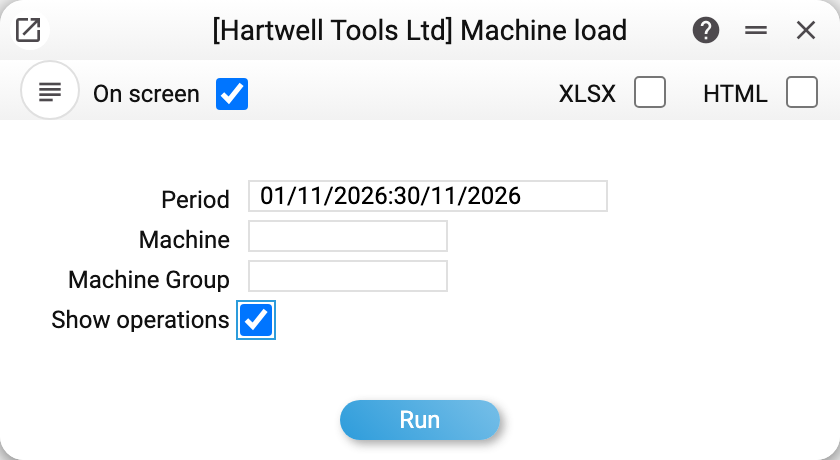
The report answers the shop manager's and the director's question: "how many hours have the machines already worked, how much is in progress and planned, and how much free time is left" for a period. Capacity comes from the weekly schedule on the machine card, hours come from the production operations run on that machine.
Where to find it: Modules → Production → Reports → Machine load
Parameters
- Period — the window opens with the default reporting period, like the other reports; a cleared field becomes today. Through the API or MCP an empty period means the current month, one bound — the month of that bound. A period longer than a year, or a start later than the end, is refused: "Incorrect period!" / "Check the period dates".
- Machine — only this machine.
- Machine Group — the machines of this group (by the Group field on the machine card) and operations that name only this group without a machine. Both fields can be filled: the report then shows the machine only if it belongs to that group.
- Show operations — under every machine the operations its hours are made of are listed: operation number, production (work order) number, state, dates and hours.
What the columns hold
| Column | What it holds |
|---|---|
| Capacity, h | how many hours the machine is available in the period by its weekly schedule |
| Worked, h | finished operations of the machine: from the start date and time to the end date and time, within the period |
| In progress, h | started operations: the machine's working hours by its schedule from the start of the operation to the current moment, but not past the end of the period |
| Planned, h | created operations not yet started — by the time norm of their rows (which operation falls into the period — below) |
| Load, % | (worked + in progress) / capacity |
| With plan, % | (worked + in progress + planned) / capacity |
Machines are grouped by machine group; under every group there is "Total for the group", at the end — "Total". Hours in the totals cover every line, percentages only the machines that have a schedule.
Where capacity comes from
From the lower half of the machine card: the ticked days of the week and the "from" and "to" hours of each day. The report walks every day of the period and adds up the shifts:
- an end earlier than the start is a night shift through midnight: 22:00–06:00 gives 8 hours; the shift of the last day of the period counts only up to midnight, and the shift of the day before the period counts with its morning hours;
- a ticked day without hours (or with equal "from" and "to") is round the clock, 24 hours;
- a machine with no ticked day shows "no schedule" in the capacity column, and its percentages are empty: not 0 %, because there is nothing to compare with.
Where the norm for "Planned" comes from
An operation not yet started has no actual time, so the report takes the norm from its rows — those whose unit is a time unit. This is set up in the units register: the "hour" unit gets the Time type and Seconds = 3600. The unit comes from the operation row, or, when it is empty, from the item card.
Operation rows are per one product, as everywhere in production, so planned hours = row quantity × operation quantity × seconds of the unit / 3600. A "Cutting, 2 h" row in an operation for 5 products is 10 planned hours.
Which period an operation not yet started goes to. Operations created by a production started "now" have no start date: the operation's start sets it. The report treats such an operation as a queue for today, or, if the production was started with a later date, for that date; so it lands in "Planned" of the period that contains today, and in the Show operations mode it is marked "no date". A start date the operation already has is taken as it is: one entered by hand, or the production's start date when it was entered in the production (backdated) — the operations then get it at once. A period that ended before today has no queue.
Worked example
A machine works Monday to Friday from 08:00 to 19:00, weekends not ticked. November 2026 has 21 working days, so the capacity is 21 × 11 = 231 h.
During the month operations for 46.5 h were finished on it, one operation is started and has been running for 4 h, and the created operations will take another 12 h by their norm:
| Capacity, h | Worked, h | In progress, h | Planned, h | Load, % | With plan, % |
|---|---|---|---|---|---|
| 231 | 46.5 | 4 | 12 | 21.9 | 27.1 |
Load is (46.5 + 4) / 231 = 21.9 %; with plan — (46.5 + 4 + 12) / 231 = 27.1 %. About 168 free hours are left in the month.
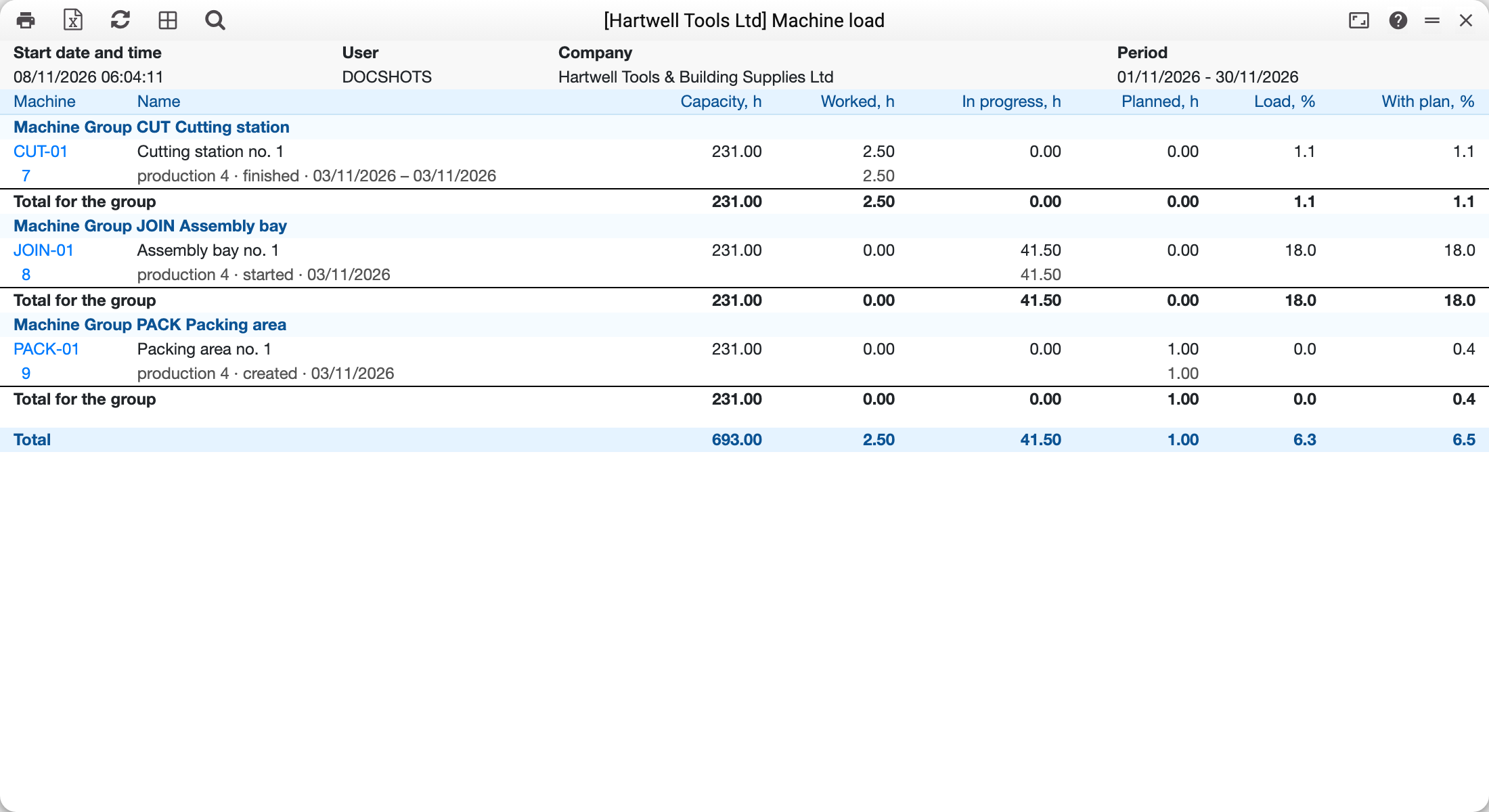
This is the report in the demo company for November with Show operations ticked. Three machine groups, one machine in each; under the machine is the operation of production 4 that gave its hours: finished on 03.11 from 08:00 to 10:30 — 2.5 h in "Worked", started — in "In progress" (working hours by the machine's schedule up to the moment of the run, so on weekdays the number grows), created — in "Planned" by the norm.
Good to know
Worked follows the clock, in progress follows the schedule. Worked time is the span from the start to the end of a finished operation — the same span the machine rate in the cost is multiplied by. An operation started on Friday at 17:00 and finished on Monday at 09:00 gives 64 hours, although by the schedule the machine does not work at weekends. For the report to tell the truth, enter the real start and end date and time in the operation.
A started operation has no end yet, so "In progress" counts only the machine's working hours by its schedule that have passed since the start: an operation started on Wednesday at 11:00 on a machine with a Mon–Fri 08:00–17:00 schedule gives 19 hours on Friday at 12:00 (6 + 9 + 4), not 49 by the clock. That way an operation forgotten unfinished does not grow over weeks into hundreds of hours above capacity. A machine without a schedule counts by the clock.
Operations without a time are not counted, but not lost either. If a finished or started operation has no start or end time, the report does not know its hours; below the table it says how many such operations there are: "Operations without a start or end time: … — their hours are not counted". The same for operations not started that have work (an item of the Work/Service type) but not a single row in a time unit: «Operations not started without a time norm (a row with a time unit): … — not in "Planned"». An operation with no work at all — say, the last stage with only material and output — needs no time and counts as zero. In the Show operations mode such rows are marked "no time" or "no norm".
The plan comes only from operations. Operations appear when a production moves to Started, and only for rows with a stage and a queue. So a production order whose production has not started yet, and a production without stages, take no machine time in the report.
An operation that names only a group goes into that group as a "No machine" line — with hours but without capacity: a machine group has no schedule for the report. An operation with neither machine nor group is not in the report.
An inactive machine is shown only when an operation of the period names it.
What the report does not take into account: holidays and schedule exceptions (only the weekly timetable), and the manual fields of the operation's Time tab — setup, waiting, moving and run time.
Where to look next
- Machines — the schedule capacity comes from.
- Production operations — where the hours come from.
- Units — the time unit for the norm.
- Production work in progress — how much money sits in started productions.